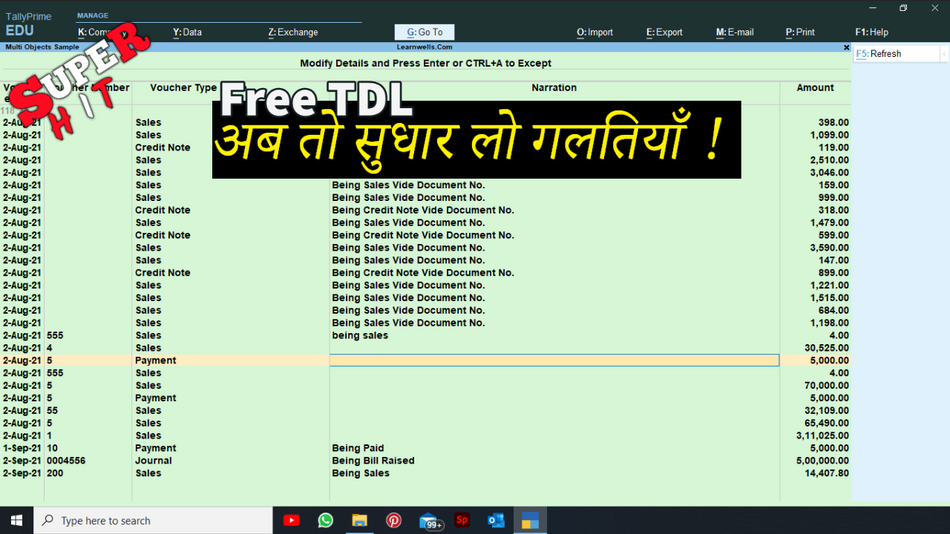
Humans make mistakes by nature. We all have the potential to make mistakes in life, work, and in Tally entry. In Tally, we occasionally make incorrect entries by accident when doing accounting. Or, occasionally, we make entries and decide to modify the letter because the data is incorrect. You are in the appropriate location if you produce entries without a voucher number or narration or anything incorrect.
Additionally, you are at the right place if you wish to change the voucher’s date or number or narration etc.. Yes, we can change the voucher date, voucher number, voucher type, and narration all at once in the voucher list using this Tally TDL file.
In this Tally Prime and Tally ERP TDL code we can add some additional fields or we can remove extra fields according to our need, and this will work perfectly with Tally Erp9 and Tally Prime. Best simple tdl code to alter voucher’s all details.
TDL code:
[#Menu        : Gate Way of Tally]
    Add    :Key Item    : At End : "Alter Voucher Detail"    : L    : Alter :LearnwellAlterVC
[Report: LearnwellAlterVC]
	Form			: LearnwellAlterVC
	Multi Objects	: LearnwellAlterVCcoll
	Title			: "Multi Objects Sample"

[Form: LearnwellAlterVC]
	Parts 			: Form SubTitle, LearnwellAlterVC
	Local: Field	: Form SubTitle	: Set As	: "Modify Details and Press Enter or CTRL+A to Except"
	Background 		: @@SV_BALANCESHEET
[Part: LearnwellAlterVC]
	Lines 			: LWAvtitleT, LWAvtitleD
	Repeat 			: LWAvtitleD		: LearnwellAlterVCcoll
	Scroll			: Vertical
	Common Border	: Yes

[Line: LWAvtitleT]
		Use		: LWAvtitleD
		Local	: Field	: Default					: Type		: String
		Local	: Field	: Default					: Delete	: Storage
		Local	: Field	: Default					: Line		: 0
		Local	: Field	: Default					: Align		: Center
		Local	: Field	: LWAvtitleD No		: Info		: "Voucher Number"
		Local	: Field	: LWAvtitleD Date		: Info		: "Voucher Date"
		Local	: Field	: LWAvtitleD Type		: Info		: "Voucher Type Name"
		Local	: Field	: LWAvtitleD Narration	: Info		: "Narration"
		Local	: Field	: LWAvtitleD Amount	: Info		: "Amount"
		Border	: Column Titles

	[Line: LWAvtitleD]
		Fields		: LWAvtitleD Date, LWAvtitleD No, LWAvtitleD Type
		Right Fields: LWAvtitleD Narration,LWAvtitleD Amount
	[Field: LWAvtitleD Date]
			Use			: Uni Date Field
			Storage		: Date
	[Field: LWAvtitleD No]
			Use			: Short Name Field
			Storage		: VoucherNumber
			Border		: Thin Left Right
	[Field: LWAvtitleD Type]
			Use			: Name Field
			Storage		: VoucherTypeName
	[Field: LWAvtitleD Narration]
			Use			: Name Field
			Storage		: Narration
			Width		: 80
			Border		: Thin Left
			Max			: 251
	[Field: LWAvtitleD Amount]
			Use			: Amount Field
			Set as		: $Amount
			Border		: Thin Left
			Skip		:Yes
[Collection: LearnwellAlterVCcoll]
	Type 	: Voucher
HOW TO USE TDL CODE:
- Copy above TDL code and make a text file.
- Save text file then load in Tally Prime (Method provided below the code)
- Now go to main screen of Tally (Gateway of Tally), there you will find a new tab in the name of Alter Voucher Details.
- go in Alter voucher details then change your required details and press CTRL+A to save vouchers.
- Change period of company to load less data.
This is best free TDL to have in your Tally . Must have TDL file for Tally ERP9 and Tally Prime that can use for lifetime. This free TDL Code will perfectly work with Tally Prime.
Watch above video to learn :
- How to see how to change voucher details
- How to change period to load less vouchers.
- How to save entries after changes.
FOLLOW THE BELLOW INSTRUCTIONS TO LOAD TDL FILE IN TALLY:
- Make a Text file of above code
- Save it in to your computer
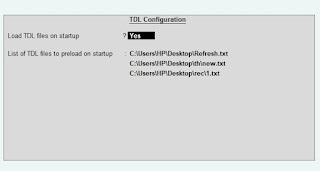
- Copy the text file path including Name and extension (as – C:\Users\HP\Desktop\rec\VoucherAlter.txt)
- Open Tally Prime Software
- Click on Help and click on TDL & Addon (for Tally Prime)
- Press F4 (to open a Box)
- Set Load TDL file on Startup – Yes
- Paste The path in blank space
- Press enter and save
- Now your Voucher Alter TDL is ready to use.
-
Convert PDF and Images to Excel Automatically with AI
Convert PDF and Images to Excel Automatically with AI. Whether you are an accountant managing hundreds of invoices or a data specialist handling complex reports, AI-powered OCR technology is your new secret weapon. USE BELOW TOOL TO CONVERT PDF OR IMAGE TO EXCEL TABLE Convert PDF and Images to Excel Automatically with AI Use this…
-
The Ultimate Excel to Tally Bank Import Utility Online
We have launched a powerful Online Bank to Tally Utility at e2t.in. This Excel to Tally Bank Import Utility Online is designed to simplify your workflow, allowing you to convert Excel bank statements into Tally-ready data in seconds. How to Use Excel to Tally Bank Import Utility Online Also check online PDF and Image to…
-
2025 Best Item Sales History Tally Prime TDL | Free Tally Prime TDL to See Item Sale History
2025 Best Item Sales History Tally Prime TDL. Tally Prime is a Best Business software, you can also use it for accounting purpose. Tally is very simple software to use but sometimes we need more flexibility and more simplicity, so we use TDL files. In Tally Prime, keeping track of item sales history while invoicing…