
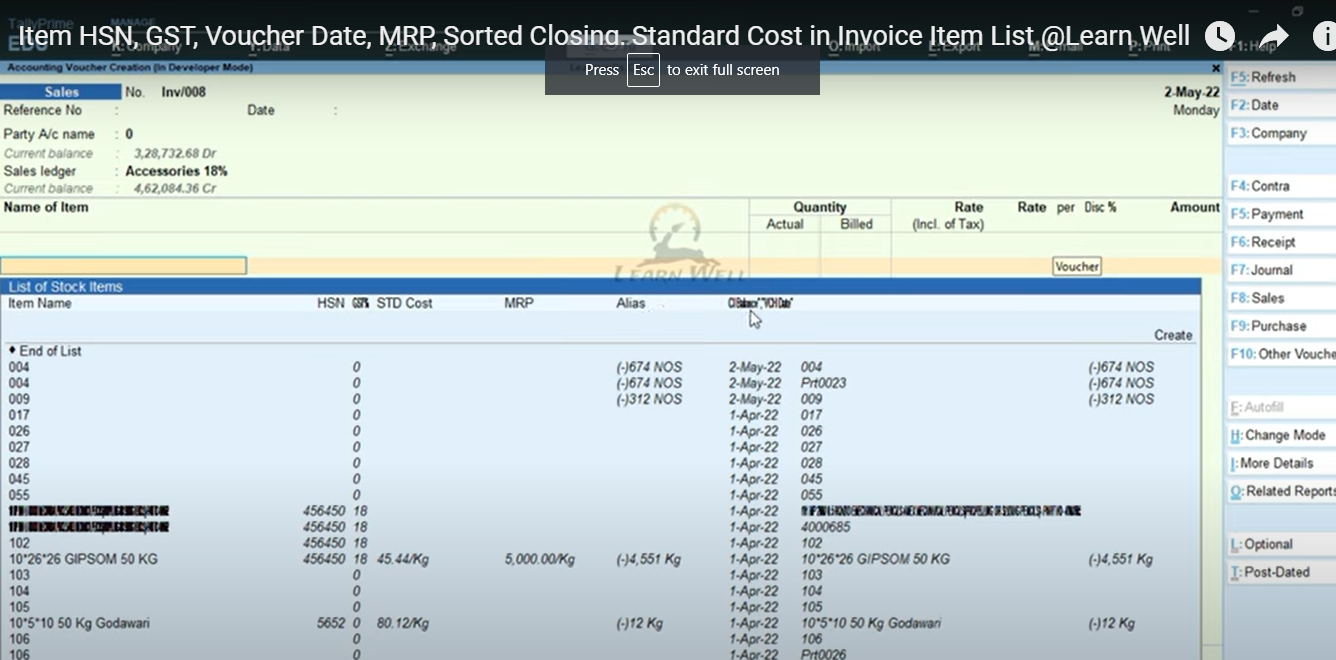
To do appropriate invoicing with stock items then you really want to have a deep understanding of items subtleties like Item HSN, GST, Voucher Date, MRP, Sorted Closing, Standard Cost and so on when make receipt.
Count have best arrangement about this kind invoicing with it’s TDL documents.
So today we will make a TDL for Tally Prime and Tally ERP9 to see item all subtleties, even likewise can see when you deal it last time with Voucher Date.
This is should have Tally TDL for Tally Prime and Tally ERP9 for invoicing.
With this Free Tally Prime TDL, we can add thing extra subtleties.
TDL Code
[#Collection:VCH Stock Item Extract]
Add:Format:$Name,20
Add:SubTitle:$$LocaleString:"Item Name","HSN","GST%","STD Cost","MRP","VCH Date","Alias",Cl Balance"
Add:Format:$GSTHSNCode
Add:Format:$GSTIGSTRate
Add:Format:$StandardCost
Add:Format:$MRPDetails[Last].MRPRateDetails[Last].MRPRate
Add:Format:$LastVoucherDate
Table Sort:$ClosingBalance
HOW TO USE TDL CODE:
- Copy above TDL code and make a text file.
- Save text file then load in Tally Prime (Method provided below the code)
- Now go to generate invoice and select item.
- Now we can see item additional details.
This is best free TDL to have in your Tally . Must have TDL file for Tally ERP9 and Tally Prime that can use for lifetime. This free TDL Code will perfectly work with Tally Prime.
Watch above video to learn :
- How to add item details in invoice.
- How to alter Tally TDL collection.
FOLLOW THE BELLOW INSTRUCTIONS TO LOAD TDL FILE IN TALLY:
- Make a Text file of above code
- Save it in to your computer
- Copy the text file path including Name and extension (as – C:\Users\HP\Desktop\rec\invoiceitem.txt)
- Open Tally Prime Software
- Click on Help and click on TDL & Addon (for Tally Prime)
- Press F4 (to open a Box)
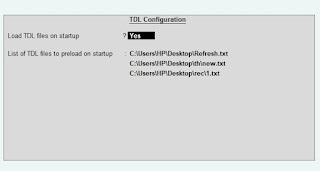
- Set Load TDL file on Startup – Yes
- Paste The path in blank space
- Press enter and save
- Now your Tooltip TDL is ready to use
-
How to Send Invoices Directly from TallyPrime to WhatsApp (New Automation TDL)
In today’s fast-paced digital business environment, waiting days for an email invoice to be opened is a thing of the past. Customers now expect instant communication, and WhatsApp has become the ultimate tool for quick business transactions. But if you are using Tally Prime, exporting a PDF and manually sending it to a client’s WhatsApp…
-
Free Excel to Tally
Tally XML Converter Use Excel,Text,CSV etc file. Columns should be same as Templates. Paste Data-Choose XML Type-Click on Create File and Download. Paste XML file path in Tally Import to Create Entry. Click for Learning Videos LEARNWELL VIDEO. Create file
-
PHP
Import Data into Tally Import Data into Tally Excel File: