

Everything possible in Tally through TDL. If you want any invoicing or reports as per your requirement, then can create through TDL (Tally Definition Language).
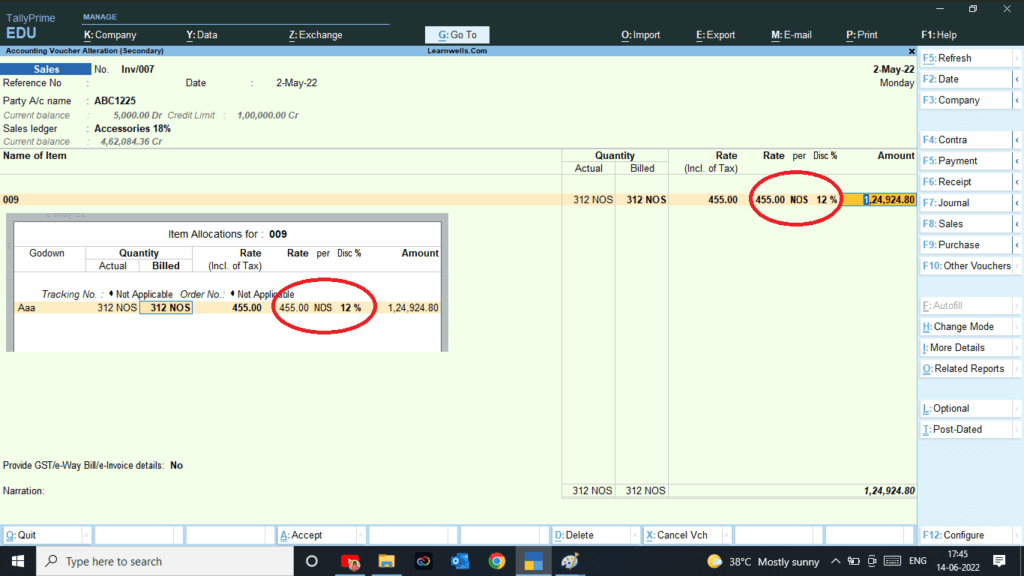
At the same sometime we need to add discount amount for Items instead of percentage.
With this we can add discount amount for all items at invoicing time.In this Tally TDL code we can add some additional fields or we can remove extra fields according to our need, and this will work perfectly with Tally Prime. Best simple tdl code to add item discount as amount in invoice.
TDL Code:
[#Field: VCH DiscTitle]
Set as: "Disc Amt"
[#Field: VCH Discount]
Delete: Format
Add: Format: "Nopercent,NoZero"
[#Field: VCHBATCH Discount]
Delete: Format
Add: Format: "Nopercent,NoZero"
[#Field: VCH Value]
Resetval: if (@@NoBaseUnits OR $$IsEmpty:BilledQty) then $$Value else (($Rate * $BilledQty) - $Discount)
How to use above TDL Code:
FOLLOW THE BELLOW INSTRUCTIONS TO LOAD TDL FILE IN TALLY:
- Make a Text file of above code
- Save it in to your computer
- Copy the text file path including Name and extension (as – C:\Users\HP\Desktop\rec\Business Summary.txt)
- Open Tally Prime Software
- Click on Help and click on TDL & Addon (for Tally Prime)
- Press F4 (to open a Box)
- Set Load TDL file on Startup – Yes
- Paste The path in blank space
- Press enter and save
- Now your Discount Amount TDL is ready to use

HOW TO SEE RESULT IN TALLY:
- Go to Sales Voucher for invoicing.
- Now we can put amount in the place of discount %.
This is best free TDL to have in your Tally . Must have TDL file for Tally ERP9 and Tally Prime that can use for lifetime. This free TDL Code will perfectly work with Tally Prime.
Watch above video to learn :
- How to add own fields and lines in Tally
- How to alter Tally field section.
- How to Modify Item details in invoice.
- And Many More…….
-
How to Send Invoices Directly from TallyPrime to WhatsApp (New Automation TDL)
In today’s fast-paced digital business environment, waiting days for an email invoice to be opened is a thing of the past. Customers now expect instant communication, and WhatsApp has become the ultimate tool for quick business transactions. But if you are using Tally Prime, exporting a PDF and manually sending it to a client’s WhatsApp…
-
Free Excel to Tally
Tally XML Converter Use Excel,Text,CSV etc file. Columns should be same as Templates. Paste Data-Choose XML Type-Click on Create File and Download. Paste XML file path in Tally Import to Create Entry. Click for Learning Videos LEARNWELL VIDEO. Create file
-
PHP
Import Data into Tally Import Data into Tally Excel File: