Invoice customization TDL

2022 Best Free Tally Prime and Tally ERP9 Invoice customization TDL | Free Tally TDL Code to customize Invoice | How to create colored Tally Invoice

1 September 2022

In a firm we all need to conduct work professionally to impress our consumers. If we present professional appearing invoice to customer, undoubtedly they will impress with our store or organisation. If you use Tally accounting software, you are in the correct spot. Tally uses a straightforward yet robust invoicing style that may contain anything. Tally Invoice, however, does not appear professional. Therefore, we will create a colourful invoice today. The item headings and other areas of the invoice are coloured.With the help of this free Tally TDL code, we can customise and colour the Tally invoice item column information to suit our needs. In this Tally Prime and Tally ERP TDL code we can add some additional fields or we can remove extra fields according to our need, and this will work perfectly with Tally Erp9 and Tally Prime. Best simple tdl code to customize Invoice. Colored Tally Invoice TDL Code: How to use Invoice customization TDL code: HOW TO USE TDL CODE: Copy above TDL code and make a text file. Save text file then load in Tally Prime (Method provided below the code) Now create an invoice and take it print You can see changed header of item details section and changed color of invoice. This is best free TDL to have in your Tally . Must have TDL file for Tally ERP9 and Tally Prime that can use for lifetime. This free TDL Code will perfectly work with Tally Prime. How to use Tally Invoice customize TDL video: Watch above video to learn : How to change names in invoice print How to add color in invoice print. FOLLOW THE BELLOW INSTRUCTIONS TO LOAD TDL FILE IN TALLY: Make a Text file of above code Save it in to your computer Copy the text file path including Name and extension (as – C:\Users\HP\Desktop\rec\invoicetdl.txt) Open Tally Prime Software Click on Help and click on TDL & Addon  (for Tally Prime) Press F4 (to open a Box) Set Load TDL file on Startup – Yes Paste The path in blank space Press enter and save Now your Invoice TDL is ready to use

free daybook GST TDL

2022 Best Tally TDL for Tally Prime and ERP9 | All in One GST TDL 2022 | GST Report TDL for All type Vouchers | Daybook GST TDL for Tally Prime

31 August 2022

To making Tally more simple we use this Daybook GST Report TDL file for Tally Prime and for Tally Erp9. It is very special TDL file that can solve your GST return filling problems. This is Free TDL file for Tally to do GST work in simple way. We generate monthly or weekly reports for sale or purchase data to filling our GST returns. Sometime we need information like GST number GST percentage, Voucher and Bill Details and there IGST, CGST, SGST amounts with all voucher type. In tally when we generate GST reports of sale or purchase or Credit Note, Debit Note or other voucher types like Journal, Receipt, Payment etc., if our data has GST ledger , It will generate all vouchers GST reports together. We can call it Daybook GST Report TDL. With this free GST TDL code we can Export GST reports into Excel and work on it according to us. It will very helpful to file GST returns with Tally. We can use this TDL file for Tally Prime and Tally ERP9 We can modify this TDL code according to our need. We can add some additional fields, we can remove extra fields, and it is very simple to work with Tally Erp9 and Tally Prime. Best simple tdl code to Generate GST Reports. Daybook GST TDL Code: How to Daybook GST Report TDL code: HOW TO USE TDL CODE: Copy above TDL code and make a text file. Save text file then load in Tally Prime (Method provided below the code) Now a line will show in the name of Learnwell-GST in our tally home screen Gateway of Tally Click on it  and provide date for the period that you want to see and Export GSTIN report. You can also give a range to filter GST reports according to your need. This is best free TDL to have in your Tally . Must have TDL file for Tally ERP9 and Tally Prime that can use for lifetime. This free TDL Code will perfectly work with Tally Prime. How to use Daybook GST TDL video: Watch above video to learn : How to see daybook GST reports in Tally. How to filter details of voucher. FOLLOW THE BELLOW INSTRUCTIONS TO LOAD TDL FILE IN TALLY: Make a Text file of above code Save it in to your computer Copy the text file path including Name and extension (as – C:\Users\HP\Desktop\rec\daybookGST.txt) Open Tally Prime Software Click on Help and click on TDL & Addon  (for Tally Prime) Press F4 (to open a Box) Set Load TDL file on Startup – Yes Paste The path in blank space Press enter and save Now your Daybook GST Report TDL is ready to use

item detailed history

Full Detailed Item History TDL at Invoice Time | 2022 Best Tally Prime and Tally ERP 9 TDL for Invoicing | Sales and Purchase History TDL

29 August 2022

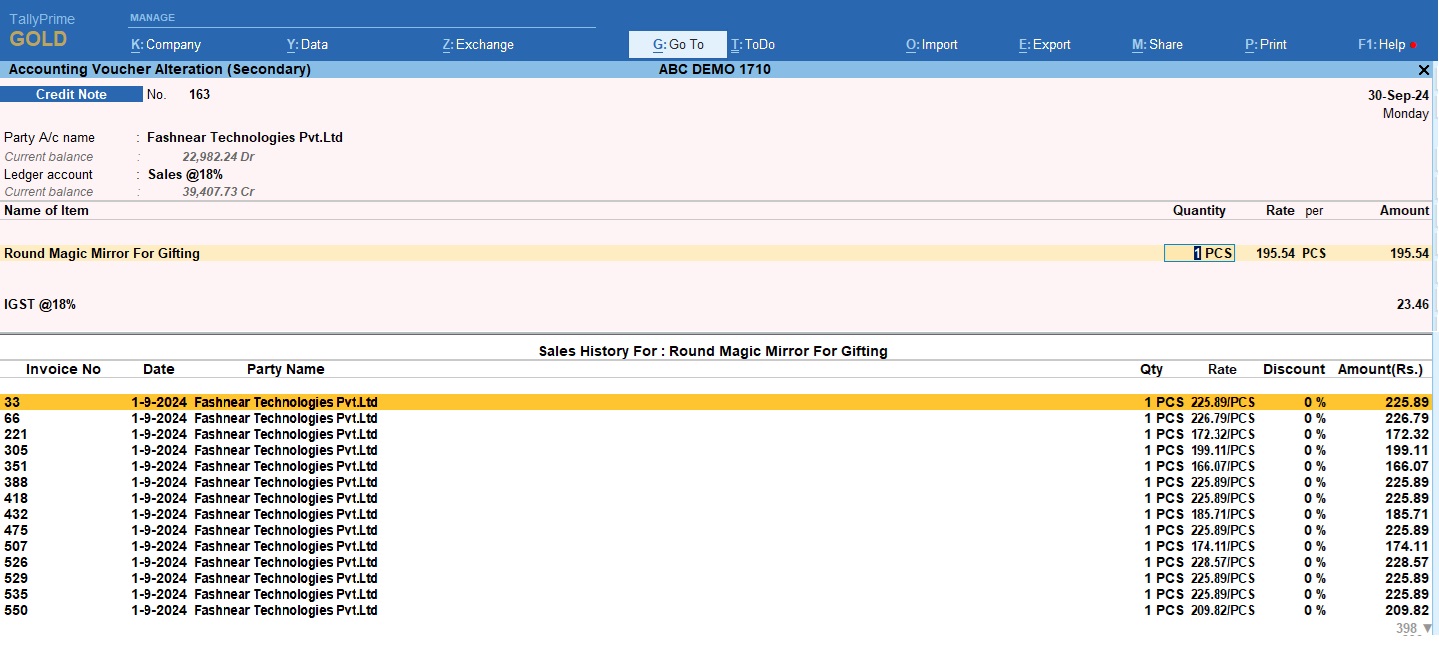
We always need something special that solve all our problems and create all things in simple way according to our need. Same things we required when invoicing in Tally. When we select any item in Tally invoice we need to see it’s history of sales and purchase with all details. Like when this item was purchased or sold, who was the customer, Date, item rate, quantity,discount etc.. Everything we need to know about that item. So today I have special full detailed item history TDL at invoice time for your Tally Prime and Tally ERP9. With this free TDL code we can see Invoice number, Date, voucher type, Party Detail, Item Rate, Discount, Amount, Godown etc. in One place. Load TDL file in Tally ERP9 or in Tally Prime, then go for invoicing , select item and press Alt+H to see full history of stock item with Sales, Purchase, Debit and Credit Note History. We can modify this TDL code according to our need. We can add some additional fields, we can remove extra fields, and it is very simple to work with Tally Erp9 and Tally Prime. Best simple tdl code to make see full Item History Detail. TDL Code: How to use Item detailed history TDL code: HOW TO USE TDL CODE: Copy above TDL code and make a text file. Save text file then load in Tally Prime (Method provided below the code) Now go to generate invoice and select item and and press ctrl+H to see item history. In item history you will find Sales and Purchase details of item with there Date, Party Name, Voucher type, Invoice number, item rate, item discount, quantity, godown etc. everything in one place. This is best free TDL to have in your Tally . Must have TDL file for Tally ERP9 and Tally Prime that can use for lifetime. This free TDL Code will perfectly work with Tally Prime. How to use Item history TDL video: Watch above video to learn : How to add see item full history tdl. How to load tdl code in Tally prime and how to use Tally shortcut button for item history TDL. FOLLOW THE BELLOW INSTRUCTIONS TO LOAD TDL FILE IN TALLY: Make a Text file of above code Save it in to your computer Copy the text file path including Name and extension (as – C:\Users\HP\Desktop\rec\itemhistory.txt) Open Tally Prime Software Click on Help and click on TDL & Addon  (for Tally Prime) Press F4 (to open a Box) Set Load TDL file on Startup – Yes Paste The path in blank space Press enter and save Now your Item full history TDL is ready to use

alter voucher details

See and Change Voucher Details TDL | Change anything in a Voucher List | Free Tally TDL to alter Vouchers | 2022 Best Tally Prime TDL to Alter Voucher Details

27 August 2022

Humans make mistakes by nature. We all have the potential to make mistakes in life, work, and in Tally entry. In Tally, we occasionally make incorrect entries by accident when doing accounting. Or, occasionally, we make entries and decide to modify the letter because the data is incorrect. You are in the appropriate location if you produce entries without a voucher number or narration or anything incorrect. Additionally, you are at the right place if you wish to change the voucher’s date or number or narration etc.. Yes, we can change the voucher date, voucher number, voucher type, and narration all at once in the voucher list using this Tally TDL file. In this Tally Prime and Tally ERP TDL code we can add some additional fields or we can remove extra fields according to our need, and this will work perfectly with Tally Erp9 and Tally Prime. Best simple tdl code to alter voucher’s all details. TDL code: HOW TO USE TDL CODE: Copy above TDL code and make a text file. Save text file then load in Tally Prime (Method provided below the code) Now go to main screen of Tally (Gateway of Tally), there you will find a new tab in the name of Alter Voucher Details. go in Alter voucher details then change your required details and press CTRL+A to save vouchers. Change period of company to load less data. This is best free TDL to have in your Tally . Must have TDL file for Tally ERP9 and Tally Prime that can use for lifetime. This free TDL Code will perfectly work with Tally Prime. Watch above video to learn : How to see how to change voucher details How to change period to load less vouchers. How to save entries after changes. FOLLOW THE BELLOW INSTRUCTIONS TO LOAD TDL FILE IN TALLY: Make a Text file of above code Save it in to your computer Copy the text file path including Name and extension (as – C:\Users\HP\Desktop\rec\VoucherAlter.txt) Open Tally Prime Software Click on Help and click on TDL & Addon  (for Tally Prime) Press F4 (to open a Box) Set Load TDL file on Startup – Yes Paste The path in blank space Press enter and save Now your Voucher Alter TDL is ready to use.

trial balance tdl

2022 Best Free TDL for Tally Prime & Tally ERP9 | Tally MIS TDL | Voucher wise Trial Balance

23 August 2022

We all aware of how important is reporting in a company. There are several reporting modules available when using Tally. But occasionally, we couldn’t find the necessary report in Tally. If we want to view a trial balance for each voucher, a summary of the opening, closing, sales, purchases, receipts, payments, and journal amounts with groups and subgroups, we may do so. With this TDL code we can see Voucher wise Trial Balance. Yes, using this free Tally TDL (Tally Definition Language) file will enable you to create reports of this type. Get your Tally trial balance via voucher right now. Summarized amounts for Ledger Opening, Closing, Sales, Purchase, Receipt, Payment, Journal, and other transactions with Groups and Sub Groups. Easy to create monthly MIS reports. Voucher Wise Trial Balance TDL Code: HOW TO USE TDL CODE: Copy above TDL code and make a text file. Save text file then load in Tally Prime (Method provided below the code) Now an extra tab will appear in your Tally main screen (Gateway of Tally)  Go with the LearnwellTB Tab to see voucher wise trial balance reports. This is best free TDL to have in your Tally . Must have TDL file for Tally ERP9 and Tally Prime that can use for lifetime. This free TDL Code will perfectly work with Tally Prime. Watch above video to learn : How to use Tally TDL and load in Tally. How to use voucher wise trial balance report. FOLLOW THE BELLOW INSTRUCTIONS TO LOAD TDL FILE IN TALLY: Make a Text file of above code Save it in to your computer Copy the text file path including Name and extension (as – C:\Users\HP\Desktop\rec\Trialbalance.txt) Open Tally Prime Software Click on Help and click on TDL & Addon  (for Tally Prime) Press F4 (to open a Box) Set Load TDL file on Startup – Yes Paste The path in blank space Press enter and save Now your voucher wise trial balance TDL is ready to use

Bank Details with QR Code in Invoice | 2022 Best Free Tally Prime TDL

26 March 2022

We always follow best techniques to do our work smartly and finish on time. In this QR images play important roles in our daily life work. If we want to pay instantly and without any error, we use QR code because QR payment methods are easily available and can do transactions with any UPI payment apps. And same if we use Tally to generate invoices, there are bank details option in Invoice printing. With this bank details our customers can pay by adding our account details on there books/Bank. But this is lengthy process on today’s era. But if you want to collect payments instantly then can use QR images in Invoice. So today I will provide a best TDL code to add Bank details with QR Code in our Tally invoices. We can add QR image along with Bank Details. With this anyone can pay our bills by scanning of QR images. In this TDL code we use Tally Prime QR code facility.In this Tally Prime TDL code we can add some additional fields or we can remove extra fields according to our need, and this will work perfectly with Tally Prime. Best simple tdl code add QR code in Invoices. HOW TO USE: Copy below TDL code and make a text file Save text file then load in Tally Prime (Method provided below the code) Now go for invoicing and enable bank details for invoice. Now we can see Bank details with QR Code Image in our Invoice print. This is best free TDL to have in your Tally . Must have TDL file for Tally ERP9 and Tally Prime that can use for lifetime. This free TDL Code will perfectly work with Tally Prime. Watch above video to learn : How to add extra fields in Invoice Print How to add Use Tally QR code facility. TDL Code :  FOLLOW THE BELLOW INSTRUCTIONS TO LOAD TDL FILE IN TALLY: Copy the code and paste in a Text file. Save the text file into your computer. Copy the text file path including Name and extension (as – C:\Users\HP\Desktop\rec\Party Detail.txt) Open Tally Prime Click on Help and click on TDL & Addon  (for Tally Prime) Press F4 (to open a Box) Load TDL file on Startup – Yes Paste The path in blank space Press enter and save  Now your TDL is ready to use.

Free Tally Prime and Tally ERP9 TDL – Voucher Type Changer and Voucher Numbering Automatic to Manual | 2022 Best TDL for Tally Prime

19 March 2022

Sometime when we use Tally and need corrections for previous entries. When we wrongly entered voucher type and want to change it. But changing any voucher one by one, takes more time and going through lengthy process. And same if we want to change voucher numbering automatic to manual then our automatic voucher numbering gone blank. If you required change voucher type along with voucher numbering automatic to manual, then you are in right place. Now we can change voucher type and voucher number system in bulk with this free tally TDL. With this free Tally Prime TDL and Tally ERP9 TDL we can change voucher types and voucher numbering in bulk in few seconds. How to Use: Copy the below Tally TDL Code and make a Text file Load in Tally ERP9 or in Tally Prime (Method provided below) Now go to Daybook, You will find Two extra buttons in right side toolbar (Change Voucher Type and Change Voucher Numbering) Use Voucher type changer button to change voucher type and Voucher numbering button to change voucher numbering Automatic to Manual. This is best free TDL to have in your Tally . Must have TDL file for Tally ERP9 and Tally Prime that can use for lifetime. This free TDL Code will perfectly work with Tally Prime. TDL Code: Watch above video to learn : How to load TDL file in Tally. How to add toolbar buttons How to use Voucher Changer TDL code in Tally Prime HOW TO USE TDL CODE: Copy TDL code and Make a Text file Save into your computer. Copy the text file path including Name and extension (as – C:\Users\HP\Desktop\rec\Party Detail.txt) Open Tally ERP9  OR Tally Prime Press F12 and goto Product and Features (for Tally ERP9) Click on Help and click on TDL & Addon  (for Tally Prime) Press F4 (to open a Box) Load TDL file on Startup – Yes Paste The path in blank space Press enter and save 

Ledger and Outstanding Notes TDL for Tally Prime and Tally ERP9 | 2022 Best free Tally Prime TDL

16 March 2022

We all want to do business properly and collect outstanding timely to run business smoothly. So today I have something special for your Tally. When we reconcile any ledger accounts of debtors or creditors, we create some notes that can remember it for next time and save time in re-reconciliation. This is important to create notes for ledger account and can use to see in outstanding reports. If you use Tally software for your business accounting, you are in right place. With this free Tally Prime TDL and Tally ERP9 TDL we can add ledger notes that also can see in ledger outstanding report. HOW TO USE: Download TDL code with provided link Load in Tally ERP9 or in Tally Prime (Method provided below) Now go to Ledger Account to add notes (See the video for more detail) Also can see added notes in Outstanding Reports/Group Summary of Debtors or Creditors. This is best free TDL to have in your Tally . Must have TDL file for Tally ERP9 and Tally Prime that can use for lifetime. This free TDL Code will perfectly work with Tally Prime. Watch above video to learn : How to load TDL file in Tally. How to add Notes in Ledger Account TDL Code: HOW TO USE TDL CODE: FOLLOW THE BELLOW INSTRUCTIONS TO LOAD TDL FILE IN TALLY: Copy above TDL code and make a text file. Save into your computer. Copy the text file path including Name and extension (as – C:\Users\HP\Desktop\rec\Party Detail.txt) Open Tally ERP9  OR Tally Prime Press F12 and goto Product and Features (for Tally ERP9) Click on Help and click on TDL & Addon  (for Tally Prime) Press F4 (to open a Box) Load TDL file on Startup – Yes Paste The path in blank space Press enter and save 

Mailing Name TDL for Tally Prime | Vouchers with Party Mailing Name. Must have for cash billing | 2022 Best Free Tally Prime TDL

15 March 2022

If your most of billings in cash or you want customer mailing name along with cash, then this TDL is for your Tally. With this TDL file we can we can add party mailing name after party ledger at invoicing time. In this we can also add party mobile number to collect outstanding easily. And also can see Mailing names in Ledger report. In this Tally Prime and Tally ERP TDL code we can add some additional fields or we can remove extra fields according to our need, and this will work perfectly with Tally Erp9 and Tally Prime. Best simple tdl code to get mailing name in invoice screen and in ledger reports. HOW TO USE: Copy below TDL code and make a text file. Save text file then load in Tally ERP9 or in Tally Prime (Method provided below the code) Now go for invoicing and select party name and press enter write mailing name. This is best free TDL to have in your Tally . Must have TDL file for Tally ERP9 and Tally Prime that can use for lifetime. This free TDL Code will perfectly work with Tally Prime. Watch above video to learn : How to add extra fields in voucher screen. How to add extra fields in ledger summary. And Many More…… TDL Code :  HOW TO USE ABOVE CODE: Copy the code and paste in a Text file.  Save the text file into your computer.  Copy the text file path including Name and extension (as – C:\Users\HP\Desktop\rec\Party Detail.txt) Open Tally ERP9  OR Tally Prime Press F12 and goto Product and Features (for Tally ERP9) Click on Help and click on TDL & Addon  (for Tally Prime) Press F4 (to open a Box)  Load TDL file on Startup – Yes  Paste The path in blank space Press enter and save