
attachement tdl

Attach Document in Voucher | 2022 Best Free Tally Prime and Tally ERP9 TDL | Voucher with Attachment TDL

24 August 2022

We put a lot of effort into making everything great. Tally is now the most useful accounting and business software, and we may alter Tally to suit our needs due to TDL Codes. In this post we will see how to Attach Document in Voucher. Sometimes while creating vouchers for things like sales, purchases, journal entries, and payments, we wonder whether we may include any crucial scans of documents. Yes! It is much faster to attach a document in Tally Voucher than to search through files and other locations. Simply open Tally to view the attachment. This will both save us a tonne of time and help us avoid making mistakes. I thus have a very essential task for you and your company. With this amazing free Tally ERP9 and Tally Prime TDL code we can  attach any document, when we creating vouchers and can see it latter.Your documents can be in JPG or Pdf or any other form. This Tally TdL make our work more effective and accurate. This is must have  TDL file for Tally ERP9 and Tally Prime that can use for lifetime.  It will work in all Tally versions. for more detail watch the video. TDL code: HOW TO USE TDL CODE: Copy above TDL code and make a text file. Save text file then load in Tally Prime (Method provided below the code) Now go to create vouchers, there you will find a space to paste file path. And same you will find Open file button in side bar to open attachment of vouchers at any time even after saving a voucher. This is best free TDL to have in your Tally . Must have TDL file for Tally ERP9 and Tally Prime that can use for lifetime. This free TDL Code will perfectly work with Tally Prime. Watch above video to learn : How to see how to create own field in Tally voucher screen. How to create side bar button in Tally. How to use storage in Tally TDL FOLLOW THE BELLOW INSTRUCTIONS TO LOAD TDL FILE IN TALLY: Make a Text file of above code Save it in to your computer Copy the text file path including Name and extension (as – C:\Users\HP\Desktop\rec\attachement.txt) Open Tally Prime Software Click on Help and click on TDL & Addon  (for Tally Prime) Press F4 (to open a Box) Set Load TDL file on Startup – Yes Paste The path in blank space Press enter and save Now your voucher with attachment TDL is ready to use.

Prevent Master duplication TDL | 2022 Best Tally Prime and Tally ERP9 TDL to Prevent Duplicate Ledger and Item

21 August 2022

Stop Master duplication in Tally TDL can boost your business performance. Tally is a most usable business software in India because of it’s simplicity and reporting system. If you maintain your masters and vouchers correctly in Tally then it will become life saving tool for business. But sometime by mistake we create some duplicate masters with another name and by repeating this mistake we make our Tally Data a garbage and can not create a proper reports. So we need to avoid this type mistakes if we want to do proper accounting.  To avoid this type mistakes I have something special for our Tally. We can create a TDL to avoid master duplication so we can do all things in proper way.  So today in this post we will create a TDL for our Tally prime and also for Tally ERP9 to prevent duplicate masters. In this TDL we will add a Master list in Tally Master creation screen so when we go to create masters first we track the name of Ledger or Item that we want to create then after searching we can create unique masters. This is must have Tally TDL for Tally Prime and Tally ERP9 to prevent master duplication.With this Free Tally Prime TDL, we can add ledgers and item lists in our master creation screen that can be tracked by typing present names in Tally master.In this code we do two steps – one for Ledger master and another for Item masters. TDL Code HOW TO USE TDL CODE: Copy above TDL code and make a text file. Save text file then load in Tally Prime (Method provided below the code) Now go to create Ledger or Stock Item Master There you will find ledger list or item list and can search the name before creating new master. This is best free TDL to have in your Tally . Must have TDL file for Tally ERP9 and Tally Prime that can use for lifetime. This free TDL Code will perfectly work with Tally Prime. Watch above video to learn : How to add master table in Master creation screen. How to alter Tally Master creation screen fields and parts FOLLOW THE BELLOW INSTRUCTIONS TO LOAD TDL FILE IN TALLY: Make a Text file of above code Save it in to your computer Copy the text file path including Name and extension (as – C:\Users\HP\Desktop\rec\Stop Duplicate.txt) Open Tally Prime Software Click on Help and click on TDL & Addon  (for Tally Prime) Press F4 (to open a Box) Set Load TDL file on Startup – Yes Paste The path in blank space Press enter and save Now your prevent duplicate TDL is ready to use

Automatic Last Rate and Last Discount Ledger Wise and Item Wise | 2022 Best Tally Prime TDL

4 July 2022

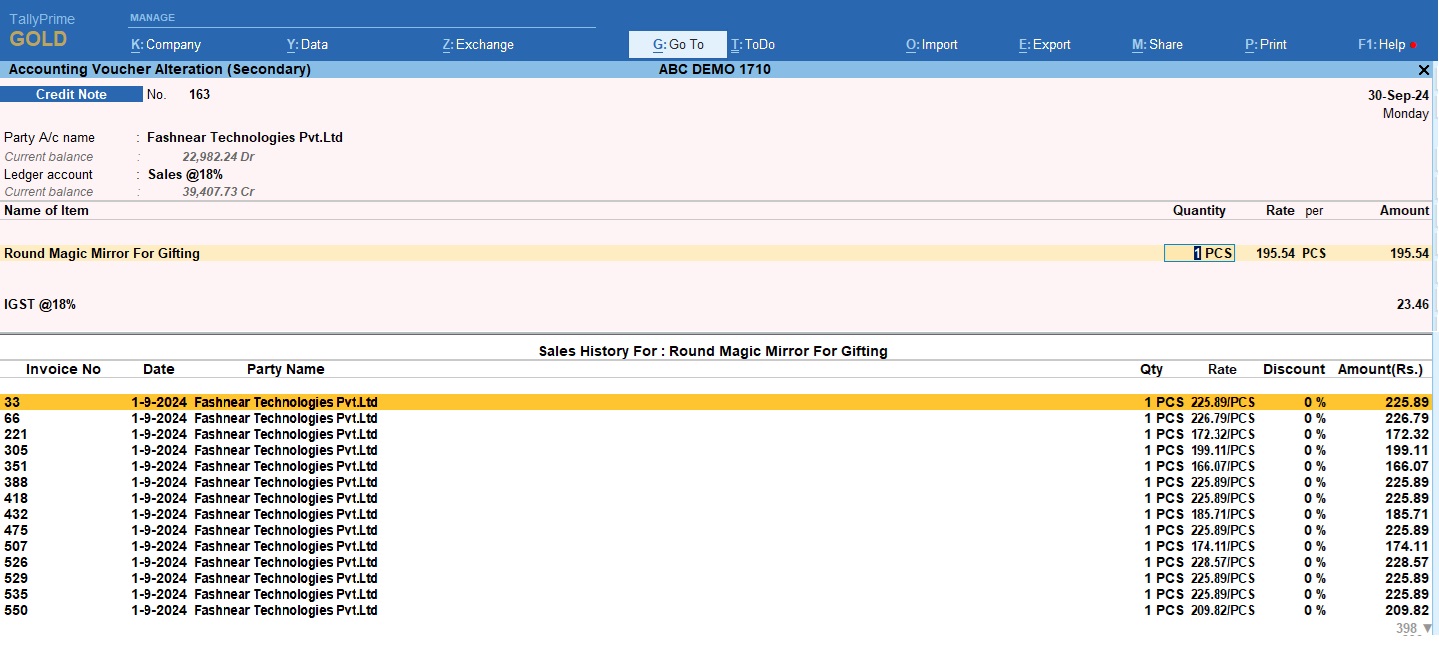
Sometime when we do accounting and create invoices of customer, there is lots of things to do in an invoice. We need to check customer all details like, there products, GST, Discount, Selling price, purchase price etc. When customer come to you and told that last time you provided this discount and product price was different, then you go to check there previous details and tell customer the truth that the price and discount was this. If we use Tally then these things become smooth, because of Tally TDL (Tally Definition Language). With TDL file we can fetch customer last purchase rate and item discounts. And at the same invoicing time we can check party last purchase rate and there discounts. So today have something special for your Tally. With this Tally TDL we can track customer or Ledger wise last rate and item discounts and can set it automatically in invoice. After adding this Automatic Last Rate and Last Discount Ledger Wise and Item Wise TDL we can solve all our problems related to customer.If you use Tally Prime or Tally ERP9, this Automatic Last Rate and Last Discount Ledger Wise and Item Wise TDL will help to create invoice correctly . And always this will help to remember customer discounts and there item prices.  This is must have Tally TDL for Tally Prime and Tally ERP9.With this Free Tally Prime TDL, Now we can create invoice correctly without any fail. TDL code: How to use above TDL Code: FOLLOW THE BELLOW INSTRUCTIONS TO LOAD TDL FILE IN TALLY: Make a Text file of above code Save it in to your computer Copy the text file path including Name and extension (as – C:\Users\HP\Desktop\rec\Business Summary.txt) Open Tally Prime Software Click on Help and click on TDL & Addon  (for Tally Prime) Press F4 (to open a Box) Set Load TDL file on Startup – Yes Paste The path in blank space Press enter and save Now your Auto Last sale rate with Auto last discount TDL is ready to use HOW TO SEE RESULT IN TALLY: Go to Sales Voucher for invoicing. Now we can see previous sale amount and discount % automatic fetches as per ledger. This is best free TDL to have in your Tally . Must have TDL file for Tally ERP9 and Tally Prime that can use for lifetime. This free TDL Code will perfectly work with Tally Prime. Watch above video to learn : How to add own fields and lines in Tally How to alter Tally field section. How to Modify Item details in invoice. And Many More…….

Item Wise Discount Amount Instead of Percentage | 2022 Best Free Tally Prime TDL

30 June 2022

Everything possible in Tally through TDL. If you want any invoicing or reports as per your requirement, then can create through TDL (Tally Definition Language). At the same sometime we need to add discount amount for Items instead of percentage. With this we can add discount amount for all items at invoicing time.In this Tally TDL code we can add some additional fields or we can remove extra fields according to our need, and this will work perfectly with Tally Prime. Best simple tdl code to add item discount as amount in invoice. TDL Code: How to use above TDL Code: FOLLOW THE BELLOW INSTRUCTIONS TO LOAD TDL FILE IN TALLY: Make a Text file of above code Save it in to your computer Copy the text file path including Name and extension (as – C:\Users\HP\Desktop\rec\Business Summary.txt) Open Tally Prime Software Click on Help and click on TDL & Addon  (for Tally Prime) Press F4 (to open a Box) Set Load TDL file on Startup – Yes Paste The path in blank space Press enter and save Now your Discount Amount TDL is ready to use HOW TO SEE RESULT IN TALLY: Go to Sales Voucher for invoicing. Now we can put amount in the place of discount %. This is best free TDL to have in your Tally . Must have TDL file for Tally ERP9 and Tally Prime that can use for lifetime. This free TDL Code will perfectly work with Tally Prime. Watch above video to learn : How to add own fields and lines in Tally How to alter Tally field section. How to Modify Item details in invoice. And Many More…….