
We all utilise Tally because of its easy vouching process and accurate reports. However, there are times when we need to add an additional item column while creating a voucher and printing an invoice. We may add our own extra column for item detail in the voucher and print it in the invoice with the help of this straightforward Tally TDL code.
With the help of this Free Tally TDL code, we may add our own columns to the Tally invoice item columns and change them as necessary.
We may add or remove new fields from this Tally Prime and Tally ERP TDL code in accordance with our needs, and it will function flawlessly with Tally Erp9 and Tally Prime. Best easy tdl code for invoice customization.
TDL Code:
[#Line:EI ColumnOne]
Add : Right Field : Before : VCH QtyTitle : OWNFIELD
Local : Field : OWNFIELD : INFO : "Own Heading"
[#Line:EI InvInfo]
add : right field : before : VCH ActualQty :OWNFIELD
[Field : OWNFIELD]
use : Name field
Storage :OWNFIELDStorage
Set always : yes
Width : 15
Align : Center
invisible : not@@ISSALES @@ISSALESORDER
[System : UDF]
OWNFIELDStorage : String : 6000
[#Line: ExpInv Column1]
Add : left Field : After :EXPINV DescTitle : OWNFIELD
Local : Field : OWNFIELD : Info : " Own Heading"
Local : Field : OWNFIELD : Delete : Storage
Local : Field : OWNFIELD : Type : String
Local : Field : OWNFIELD : align : Center
Local : Field : OWNFIELD : Width : 10
Local : Field : OWNFIELD : border : thin left
[#Line :ExpInv InvDetails]
add : left Fields : after : EXPINV Desc :OWNFIELDStorage
[ Field : OWNFIELDStorage]
use : Name Field
Set as :$OWNFIELDStorage
Set Always : Yes
Width : 10
Align : Center
Border : Thin Left
HOW TO USE TDL CODE:
- Copy above TDL code and make a text file.
- Save text file then load in Tally Prime (Method provided below the code)
- Now go to create Invoice
- Take a print of Invoice
This is best free TDL to have in your Tally . Must have TDL file for Tally ERP9 and Tally Prime that can use for lifetime. This free TDL Code will perfectly work with Tally Prime.
Watch above video to learn :
- How to add Extra fields in Invoice.
- How to alter Tally Invoice part.
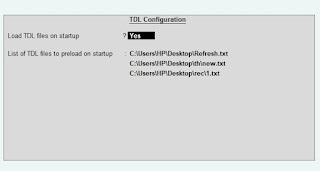
FOLLOW THE BELLOW INSTRUCTIONS TO LOAD TDL FILE IN TALLY:
- Make a Text file of above code
- Save it in to your computer
- Copy the text file path including Name and extension (as – C:\Users\HP\Desktop\rec\Invoiceextrafield.txt)
- Open Tally Prime Software
- Click on Help and click on TDL & Addon (for Tally Prime)
- Press F4 (to open a Box)
- Set Load TDL file on Startup – Yes
- Paste The path in blank space
- Press enter and save
- Now your Invoice TDL is ready to use.
-
Convert PDF and Images to Excel Automatically with AI
Convert PDF and Images to Excel Automatically with AI. Whether you are an accountant managing hundreds of invoices or a data specialist handling complex reports, AI-powered OCR technology is your new secret weapon. USE BELOW TOOL TO CONVERT PDF OR IMAGE TO EXCEL TABLE Convert PDF and Images to Excel Automatically with AI Use this…
-
The Ultimate Excel to Tally Bank Import Utility Online
We have launched a powerful Online Bank to Tally Utility at e2t.in. This Excel to Tally Bank Import Utility Online is designed to simplify your workflow, allowing you to convert Excel bank statements into Tally-ready data in seconds. How to Use Excel to Tally Bank Import Utility Online Also check online PDF and Image to…
-
2025 Best Item Sales History Tally Prime TDL | Free Tally Prime TDL to See Item Sale History
2025 Best Item Sales History Tally Prime TDL. Tally Prime is a Best Business software, you can also use it for accounting purpose. Tally is very simple software to use but sometimes we need more flexibility and more simplicity, so we use TDL files. In Tally Prime, keeping track of item sales history while invoicing…