Blog

trial balance tdl

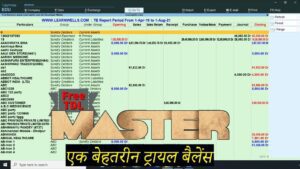
2022 Best Free TDL for Tally Prime & Tally ERP9 | Tally MIS TDL | Voucher wise Trial Balance

23 August 2022

We all aware of how important is reporting in a company. There are several reporting modules available when using Tally. But occasionally, we couldn’t find the necessary report in Tally. If we want to view a trial balance for each voucher, a summary of the opening, closing, sales, purchases, receipts, payments, and journal amounts with groups and subgroups, we may do so. With this TDL code we can see Voucher wise Trial Balance. Yes, using this free Tally TDL (Tally Definition Language) file will enable you to create reports of this type. Get your Tally trial balance via voucher right now. Summarized amounts for Ledger Opening, Closing, Sales, Purchase, Receipt, Payment, Journal, and other transactions with Groups and Sub Groups. Easy to create monthly MIS reports. Voucher Wise Trial Balance TDL Code: HOW TO USE TDL CODE: Copy above TDL code and make a text file. Save text file then load in Tally Prime (Method provided below the code) Now an extra tab will appear in your Tally main screen (Gateway of Tally)  Go with the LearnwellTB Tab to see voucher wise trial balance reports. This is best free TDL to have in your Tally . Must have TDL file for Tally ERP9 and Tally Prime that can use for lifetime. This free TDL Code will perfectly work with Tally Prime. Watch above video to learn : How to use Tally TDL and load in Tally. How to use voucher wise trial balance report. FOLLOW THE BELLOW INSTRUCTIONS TO LOAD TDL FILE IN TALLY: Make a Text file of above code Save it in to your computer Copy the text file path including Name and extension (as – C:\Users\HP\Desktop\rec\Trialbalance.txt) Open Tally Prime Software Click on Help and click on TDL & Addon  (for Tally Prime) Press F4 (to open a Box) Set Load TDL file on Startup – Yes Paste The path in blank space Press enter and save Now your voucher wise trial balance TDL is ready to use

upi transactions

UPI transactions will continue to be free: According to the Finance Ministry, affordable payment options will be promoted and UPI transactions won’t be taxed.

22 August 2022

UPI transactions will continue to be free. There have been rumours that the government may start charging for UPI payments, however the Finance Ministry has refuted these claims. The administration declared that UPI transactions will continue to be free. UPI transmits funds similarly to IMPS, according to a previous RBI discussion paper, hence UPI ought to be charged the same fund transfer transaction fee as IMPS. According to the Finance Ministry, UPI is highly practical for individuals. The economy benefits as much from it. Government officials have not discussed adding fees to the UPI service. The service provider will be reimbursed for its costs in other ways, so far as that is concerned. The ecosystem for digital payments is receiving financial backing from the government. RBI’s consultation has ignited a discussion: A few days ago, RBI asked for opinions on UPI payments and fees from the public. For this, a consultation document was also distributed. People were led to believe that the government will also charge for UPI as a result, however the Finance Ministry has already clarified everything. UPI’s NPCI operates: RBI is in charge of managing the RTGS and NEFT payment systems in India. The National Payment Corporation of India manages systems including IMPS, RuPay, and UPI (NPCI). Beginning on January 1, 2020, the government will enforce a framework with zero fees for UPI transactions. Revolution with the launch of UPI: The introduction of UPI in 2016 ushered in a revolution in the field of electronic payments. Money might be transferred immediately to a bank account thanks to UPI. Digital wallets were popular before. Wallets require KYC-like hurdles, but UPI is exempt from such requirements. 600 crore transactions in July: 600 crore transactions were made using UPI in July, according to NPCI statistics. The transaction’s value was 10.2 lakh crore rupees. UPI transactions are increasing by 7.16% month over month. The transaction value is increasing at a yearly pace of 4.76%. Special things related to UPI: Fund transfers via UPI are done in real time. One application can link several bank accounts. You only need the recipient’s cellphone number, account number, or UPI ID to send money to them. UPI was created on the IMPS model. This is why you can use the UPI app for banking around-the-clock. The use of UPI does not need the use of OTP, CVV, card numbers, expiration dates, etc. for online purchases.

Invoice customization tdl

Free TDL code to customize Invoice | Add Extra column in Invoice | 2022 best Free Invoice customization TDL for Tally Prime

22 August 2022

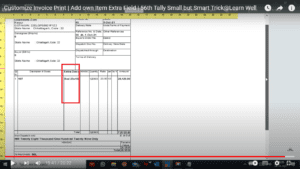
We all utilise Tally because of its easy vouching process and accurate reports. However, there are times when we need to add an additional item column while creating a voucher and printing an invoice. We may add our own extra column for item detail in the voucher and print it in the invoice with the help of this straightforward Tally TDL code.With the help of this Free Tally TDL code, we may add our own columns to the Tally invoice item columns and change them as necessary.We may add or remove new fields from this Tally Prime and Tally ERP TDL code in accordance with our needs, and it will function flawlessly with Tally Erp9 and Tally Prime. Best easy tdl code for invoice customization. TDL Code: HOW TO USE TDL CODE: Copy above TDL code and make a text file. Save text file then load in Tally Prime (Method provided below the code) Now go to create Invoice Take a print of Invoice This is best free TDL to have in your Tally . Must have TDL file for Tally ERP9 and Tally Prime that can use for lifetime. This free TDL Code will perfectly work with Tally Prime. Watch above video to learn : How to add Extra fields in Invoice. How to alter Tally Invoice part. FOLLOW THE BELLOW INSTRUCTIONS TO LOAD TDL FILE IN TALLY: Make a Text file of above code Save it in to your computer Copy the text file path including Name and extension (as – C:\Users\HP\Desktop\rec\Invoiceextrafield.txt) Open Tally Prime Software Click on Help and click on TDL & Addon  (for Tally Prime) Press F4 (to open a Box) Set Load TDL file on Startup – Yes Paste The path in blank space Press enter and save Now your Invoice TDL is ready to use.

sovereign gold bond

Opportunity to invest in Sovereign Gold Bond: From August 22, you will be able to invest money in it, you will have to pay Rs 5,147 for 1 gram of gold

21 August 2022

Your opportunity to purchase Sovereign Gold Bonds is being offered to you once more by the government. Beginning on Monday, August 22, the second series of the Sovereign Gold Bond Scheme 2022–23 will be sold. Up until August 26th, there will be an opportunity to invest in this. This time, the price of a gramme of Sovereign Gold Bond has been set by the government at Rs 5,197. You will receive a discount of Rs. 50 per gramme for submitting your application and making your payment online. In other words, the price of 1 gramme of gold is Rs 5,147. Right now gold is close to 52 thousand: You can get 24 carat pure gold by investing in a sovereign gold bond. You will need to pay Rs 51,470 if you invest 10 grammes at the rate of Rs 5,147 per gramme in this. On the other hand, the current price of gold in the bullion market is 51,802 for every 10 grammes. In other words, you have the chance to purchase gold at a lower price than the market. 2.50% interest is available on the issue price: Sovereign Gold Bonds offer a fixed interest rate of 2.50% per annum on the issue price. This money reaches your account every 6 months. However, tax will have to be paid on it according to the slab. No worries about purity and safety: Sovereign Gold Bonds are pure, thus there is no need to be concerned. The price of gold bonds, according to the National Stock Exchange (NSE), is correlated with the price of 24 karat gold released by the Indian Bullion and Jewelers Association (IBJA). Additionally, it can be retained in the form of a demat, which is free and quite safe. Tax has to be paid on withdrawal before 8 years: Gains made after the 8-year sovereign maturity term are not subject to taxation. On the other hand, if you remove your money after five years, the profit is subject to Long Term Capital Gain (LTCG) taxation, which is levied at a rate of 20.80%. You can also invest offline: The RBI has provided numerous investing alternatives. The Stock Holding Corporation of India, post offices, and bank branches all provide investment opportunities (SHCIL). An application form must be filled out by the investor. The bonds will then be transferred to your demat account after the money has been taken from your account. PAN is required for investment. All banks, Stock Holding Corporation of India Limited (SHCIL), recognised stock exchanges, including National Stock Exchange of India Limited (NSE) and Bombay Stock Exchange Limited, would participate in the sale of the bonds (BSE). 95% return given in 7 years: In 2015–16, the Sovereign Gold Bond Scheme was introduced, with a per-gram cost of Rs 2,684. On this, there was a discount of Rs 50. In other words, the cost had increased to Rs 2,634. The cost of the recently introduced series of sovereign gold bonds is Rs 5,197. This pricing is currently Rs 5,147 after a Rs 50 discount. In the last six years, the strategy has generated a return of 92% in this way. RBI issues sovereign gold bonds: An RBI-issued government bond is known as a sovereign gold bond. It is possible to change it into demat form. Its worth is measured in grammes of gold. The price of the bond will be equal to the cost of five grammes of gold if the bond has a value of five grammes of gold. To purchase it, the issue price must be paid to a broker approved by SEBI. The proceeds from the sale of the bond are placed into the investor’s account.

Prevent Master duplication TDL | 2022 Best Tally Prime and Tally ERP9 TDL to Prevent Duplicate Ledger and Item

21 August 2022

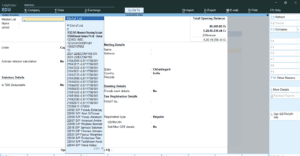
Stop Master duplication in Tally TDL can boost your business performance. Tally is a most usable business software in India because of it’s simplicity and reporting system. If you maintain your masters and vouchers correctly in Tally then it will become life saving tool for business. But sometime by mistake we create some duplicate masters with another name and by repeating this mistake we make our Tally Data a garbage and can not create a proper reports. So we need to avoid this type mistakes if we want to do proper accounting.  To avoid this type mistakes I have something special for our Tally. We can create a TDL to avoid master duplication so we can do all things in proper way.  So today in this post we will create a TDL for our Tally prime and also for Tally ERP9 to prevent duplicate masters. In this TDL we will add a Master list in Tally Master creation screen so when we go to create masters first we track the name of Ledger or Item that we want to create then after searching we can create unique masters. This is must have Tally TDL for Tally Prime and Tally ERP9 to prevent master duplication.With this Free Tally Prime TDL, we can add ledgers and item lists in our master creation screen that can be tracked by typing present names in Tally master.In this code we do two steps – one for Ledger master and another for Item masters. TDL Code HOW TO USE TDL CODE: Copy above TDL code and make a text file. Save text file then load in Tally Prime (Method provided below the code) Now go to create Ledger or Stock Item Master There you will find ledger list or item list and can search the name before creating new master. This is best free TDL to have in your Tally . Must have TDL file for Tally ERP9 and Tally Prime that can use for lifetime. This free TDL Code will perfectly work with Tally Prime. Watch above video to learn : How to add master table in Master creation screen. How to alter Tally Master creation screen fields and parts FOLLOW THE BELLOW INSTRUCTIONS TO LOAD TDL FILE IN TALLY: Make a Text file of above code Save it in to your computer Copy the text file path including Name and extension (as – C:\Users\HP\Desktop\rec\Stop Duplicate.txt) Open Tally Prime Software Click on Help and click on TDL & Addon  (for Tally Prime) Press F4 (to open a Box) Set Load TDL file on Startup – Yes Paste The path in blank space Press enter and save Now your prevent duplicate TDL is ready to use

Data Analysis Tally Prime | Best Reports of Tally Prime | Generate Important reports without TDL

19 August 2022

Friends we all use Tally because of it’s simplicity and powerful reporting system. With Tally we can do our accounting easily. Tally have lots of reporting system that we use on daily basis. But some reports we generate via TDL Files, and we don’t know that Tally already have this type reports. So Today I have something special for your reporting systems and MIS .Today I have Data Analysis system of Tally that can fulfill your lots of MIS requirements. Data Analysis facilitates is conducting internal analysis and verification of the company’s financial data. Data Analysis will help in identifying exceptional areas and thereby ease the process of verification. With the help of Data analysis we can create our important MIS reports also. Data Analysis facilities have both Tally Prime and Tally ERP9. But in Tally Prime have more features with easy to use modules. So in this post you will read about Tally Prime Data Analysis. How to view Data Analysis Report in Tally Prime: There is two methods to find data analysis reports: Gateway of Tally > Display More Reports > Analysis & Verification > Data Analysis. 2. Alternatively, press Alt+G (Go To) > type or select Data Analysis Reports > and press Enter Various tools are available in Data analysis section of Tally Prime that can be use for various purpose. Follow below sections/tab of Tally to know more: Verification of Chart of Accounts Verification of Stock Items Verification of Balances Analytical Procedures Pending Documents Periodic Payments and Receipts Repeated Transactions Relative Size factor (RSF) Inter Bank Transactions Cash Withdrawals/ Deposits to Bank Fixed Assets Analysis Transaction on holiday Highest and Lowest Value Transactions Pending Advances Stale Cheque /Instruments (Please watch the above video to see another use of Data Analysis Facility of Tally Pirme and how to use other options and buttons of Data Analysis Facility of Tally Pirme.) Verification of Chart of Accounts – Drill down into this report will help to scrutinize the Chart of Accounts and compare this with previous year Chart of Accounts and suggest the necessary corrections if required. Verification of Stock Items – Drill down into this report will help to scrutinize various Stock Items and compare the Stock Items list with the previous year. This will help in taking necessary decisions and provide necessary corrections. Verification of Balances – Drill down into this report will help to scrutinize the difference in Opening Balances and transaction details during the selected year and suggest necessary corrections based on the exceptions highlighted. The user can also generate the ledger wise variance report for the Closing Balances. Analytical Procedures – This report can be used to analyse the data based on various parameters (e.g. Group, Cost Centre etc.) by a detailed comparison mechanism available. The user can take of note areas where more attention is required. Pending Documents – This report will display all the Pending Bills, Sales Orders, Purchase Orders and Receivables & Payables during the analysis year. Periodic Payments and Receipts – This report provides the list of recurring Ledger Vouchers based on the Periodic Ledgers identified by the users. Repeated Transactions – Drill down into this report will display the transactions for which the same amount is repeated more than once for each Ledger during the analysis year. The user can use this report to check the intentional errors while passing the entries. Relative Size factor (RSF) – Drill down into this report will display the Relative Size Factor for each Ledger Voucher which is arrived by dividing the highest Voucher amount to the second-highest Voucher amount for the Ledger Vouchers. Inter Bank Transactions – This report will display all the transactions carried out between the Banks during the analysis period Cash Withdrawals/ Deposits to Bank – Drill down to this report will display the bank ledgers from which the cash is withdrawn or deposits are made. This report also displays the Total Amount of transaction and the Number of vouchers through which the withdrawal or deposits are made during the selected year. Fixed Assets Analysis – This report provides the details of all the Fixed Assets possessed by the selected Company at the end of the analysis Year. Transaction on holiday – Drill down to this report displays all the transactions recorded on Weekly Off or Declared Holidays in the analysis year. Highest and Lowest Value Transactions – This report provides ledger wise Highest and Lowest value transactions carried out during the selected period along with Difference Range and Difference Range Percentage details. Pending Advances – Drill down to this report will display the ledgers for which the advances made (Loan given) are pending during the analysis year. Stale Cheque /Instruments – Drill down to this report will display the Bank Ledgers with stale cheque/ Instruments. This report also displays the Total amount and count of stale cheques/ Instruments. Also can use another buttons like, Basic of Value, Change View, Exception Reports etc. from side bar buttons of Tally to generate more type detailed reports.

Digiyatra

Your face will be the boarding pass at the airport

18 August 2022

‘Digiyatra‘ app launched for air travelers, facial recognition system will identify you. Delhi and Bengaluru airports have launched an app ‘Digiyatra‘ for facial recognition (FR) of domestic passengers. With the launch of this app, now passengers will get rid of the hassles of entry at the airport. The beta version of the app has just been launched and soon it can be offered at full scale. According to Delhi International Airport Limited, with the help of this app, the entry of passengers will be done at all the checkpoints on the basis of facial recognition. Airport entry, security check and boarding gate will be done at all three places from the app itself. At Delhi Airport, it has been started for domestic passengers at T3 terminal. Now Android users will get the facility: Now Android users will get the facilityAt the same time, Bengaluru International Airport Limited (BIAL) said in a statement that the beta version of this app has been tested on Vistara and Air Asia flights. The beta version of Digiyatra app is available on Playstore for Android OS. The app will also be available on Apple’s iOS platform over the next few weeks. It has not been made mandatory to use the Digiyatra app as of now, passengers who want to use it can download it. Now the use of the app will be optional: Passengers will have to provide Aadhaar details for registration. Apart from this, they will be required to upload a selfie with information about the covid-19 vaccination. What is Facial Recognition System?: This is a biometric system that identifies a person by the combination of his face, eyes, mouth. In this, all the elements of the face, especially the eyes and mouth, are read. Then a 3D image of the face is created and saved in the database for identification. This technique was invented by a team of American scientists. It featured Woody Bledsoe, Helen Chan Woolf and Charles Bison. How does the FR system work?: As soon as you book your ticket for air travel from any airlines, at the same time the information related to your travel will reach the agencies stationed at the airport. As soon as you reach the terminal gate of the airport, the face recognition camera installed there will recognize your face. Once your identity is confirmed, a screen fitted with the camera will display your photo, ID and all travel related information. During this time, the security officer posted at the gate will neither have to show his/her air ticket nor need to show the identity card. Like the terminal gate, there will be face recognition cameras at the check-in counter, security check-in point and boarding gate. As soon as you arrive at the check-in counter, the face recognition camera will provide all the information related to you to the airline personnel. The Online Boarding Pass will be delivered to your mobile as soon as the airline staff check-in you. Your travel details and identity will be ensured through the security check and also at the boarding gate with the face recognition camera.

5. TDLTutorial: Rules for Writing Good TDL Code

18 August 2022

We would have fostered different codes for many activities. A venture is good when the codes created are valuable independent of whether they are little or huge. A decent quality code is characterized by its result and the time taken for the result, i.e., the presentation: lesser the time, more joyful the client. Further, assume the code is more straightforward to keep up with and fast to explore for any changes. All things considered, it will prompt a cheerful developer. Purpose of Writing Good TDL Code: A decent code influences two segments of the Tally environment the developers and users. Advantages to User : Easy to use interface Consistent route Ideal execution Advantages to Tally Developers : Fast to explore code Simple to keep up with code Quicker to fix any bug inside code Fast to any progressions in a future delivery as well as in reverse similarity Quicker and faster changes to clients endless necessities Lesser objections from clients Diminished working hours Project Creation Rules: The codes of a task should be kept up with in an envelope with the sequencing of documents and organizers. The undertaking organizer gives total lucidity on code creation and advancement. Folder Creation:Any new task made ought to be made in another Folder for each client. The folder name ought to be the client name. The organized folder makes it more straightforward to find and keep up with client wise code. Project File Creation:The task name ought to have an improvement organization name as a prefix. This naming show will stay away from any struggles with some other TDLs the client is right now utilizing or may use in the future from some other engineer. Giving substantial names guarantees there would be no conflict with some other future customisation as it has your organization’s initials. Extra Files:A tree-like organizer design ought to be kept up with for the Folder, and the File and the name ought to recommend the movement of the code. The folder design would make it simpler for the developer to find the code for change instead of looking over the whole venture code. It makes it more straightforward to track down the area of the code that needs upgrade. A different document for keeping up with fields ought to be kept up with under the module’s organizer of the individual container when many new fields are added. The record framework guarantees there would be no conflicts with any framework components when they are roofed together under a document. Project Properties:Build Option (File > Active Project Properties > Build Options) The task’s name ought to be a significant name that would recommend the kind of module created. The name would be noticeable on Tally Product and Features screen. It would make it more straightforward for the client to figure out the need/motivation behind the module.Give ‘Creator name’ as Company Name – Contact Number; alternatively, you might give developer name. The client would see these subtleties in the Tally’ TDL Management’ screen (F1:Help > TDLs and Add-ons > Alt + F5: Detailed Mode). The subtleties will make it simpler for the client to associate with you later on. Giving a variant to a task would make it simpler to distinguish the code form that is presently dynamic in the client framework. The form subtleties will help recognize when the client reports an issue or another prerequisite.A preliminary mode for the code ought to be given. This office would permit the client to approve the conveyed item for a period. The quantity of days for preliminary mode ought to be chosen in view of the kind of module. For more modest advancements like Invoice Print or Simple detailing could be three days for greater tasks could be 90 days. On receipt of affirmation from the work client, you might give an interminable code to the client.Chronic quantities of the clients ought to be kept up with under a gathering, making it simpler for you to incorporate records as and when conveyed. TDL Coding Standard: Composing a code is a workmanship that each developer ought to create. The TDL designers can accomplish this range of abilities by observing the underneath given guidelines. Header:The document header ought to give subtleties of the record’s code, creation subtleties, modified subtleties, refreshed subtleties, TallyPrime Release the code made for, later refreshed to and changes made. By giving subtleties to each record, it makes it more straightforward for any designer to grasp its motivation. Different subtleties gave would be expected to future references. Enablement of Feature/Capsule:An arrangement to empower the module/case ought to be given in Add-On screen (F1:Help > TDLs and AddOns > F6:Add-On Features). Try not to give enablement choices at some other area like Company Alteration Screen or Gateway of Tally. This game plan makes it plausible to investigate when the client reports an issue. Every one of the applicable elements and capabilities ought to be covered up or dormant until the choice is empowered. Code Commenting:Legitimate remarking ought to be given at each conceivable code to figure out the usefulness of the code. At the point when changes are made, giving remarking makes it more straightforward to the engineer for future reference to reason out the progressions made and what changes were made, and why. The remarking saves a lot of time for the designer for approving code on an experimentation premise. Naming Conventions:The name of the definition ought to recommend the usefulness of the definition prefixed with your organization name initials to keep away from future crashes with other TDLs or Default TDLs. Definitions and Attributes Indentation:There ought to be one line separating when a definition for the coherence of the code.Each essential definition like Report, Form, essential Part, Collection, Function, Border, Style, Function, Button, Menu, Name set, Resource, Query box, System, Variable, and Ruleset ought to be starting from the furthest left section ascribes one TAB indented. This styling facilitates the clarity of the code and less complex to troubleshoot.The space ought

Item HSN, GST, Voucher Date, MRP, Sorted Closing, Standard Cost in Invoice Item List

17 August 2022

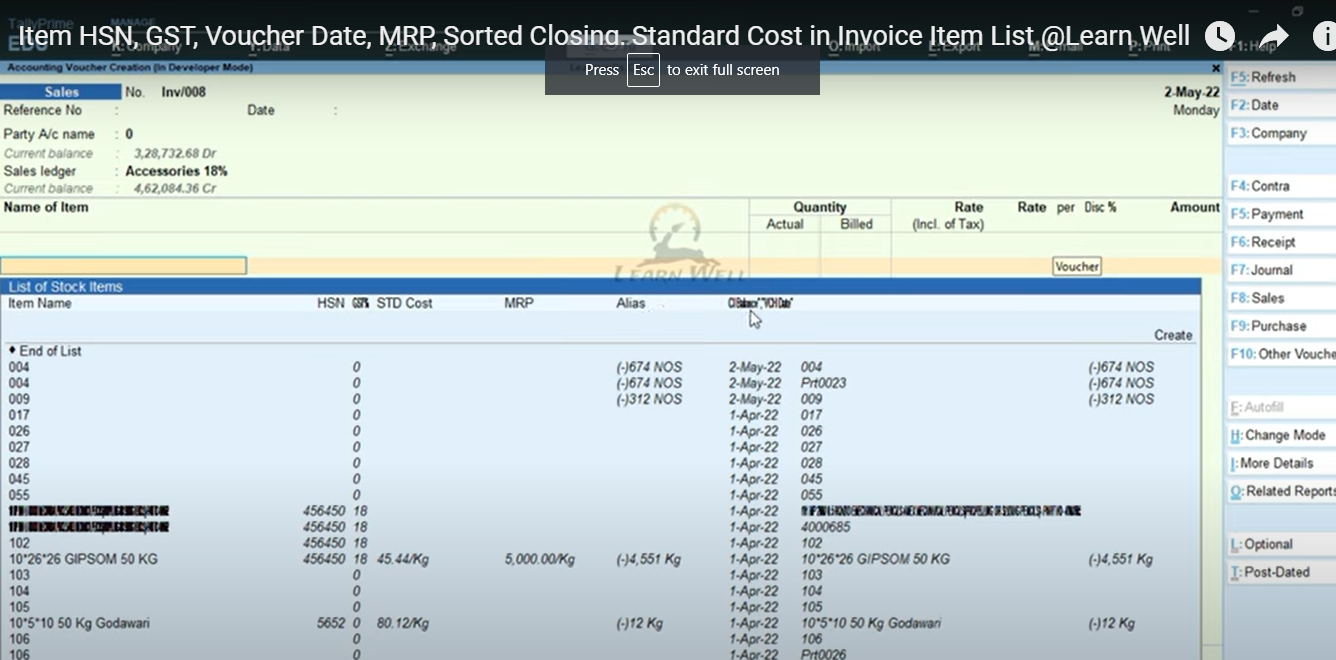
To do appropriate invoicing with stock items then you really want to have a deep understanding of items subtleties like Item HSN, GST, Voucher Date, MRP, Sorted Closing, Standard Cost and so on when make receipt.Count have best arrangement about this kind invoicing with it’s TDL documents.So today we will make a TDL for Tally Prime and Tally ERP9 to see item all subtleties, even likewise can see when you deal it last time with Voucher Date.This is should have Tally TDL for Tally Prime and Tally ERP9 for invoicing.With this Free Tally Prime TDL, we can add thing extra subtleties. TDL Code HOW TO USE TDL CODE: Copy above TDL code and make a text file. Save text file then load in Tally Prime (Method provided below the code) Now go to generate invoice and select item. Now we can see item additional details. This is best free TDL to have in your Tally . Must have TDL file for Tally ERP9 and Tally Prime that can use for lifetime. This free TDL Code will perfectly work with Tally Prime. Watch above video to learn : How to add item details in invoice. How to alter Tally TDL collection. FOLLOW THE BELLOW INSTRUCTIONS TO LOAD TDL FILE IN TALLY: Make a Text file of above code Save it in to your computer Copy the text file path including Name and extension (as – C:\Users\HP\Desktop\rec\invoiceitem.txt) Open Tally Prime Software Click on Help and click on TDL & Addon  (for Tally Prime) Press F4 (to open a Box) Set Load TDL file on Startup – Yes Paste The path in blank space Press enter and save Now your Tooltip TDL is ready to use

Send Whatsapp from Excel | Excel to Whatsapp Sender | Send Unlimited Whatsapp from Excel | Whatsapp Message Sender | Send bulk Message from Excel to Whatsapp

8 August 2022

Now we can send bulk messages in Whatsapp from Excel. Before using the code, you must see above video.Friends nowadays whatsapp become popular everywhere, and also for business. We send lots of business related messages to our customers or office employees, like outstanding details, invoice details, address etc.Sometime we need to send bulk whataspp messages to multiple contact. To avoid this lengthy process we need to make a tool that can send bulk whatsapp. So lets create whatsapp sender in Excel VBA. Follow bellow steps to create whatsapp sender: First of all open a Microsoft Excel File Goto Developer Tab (If not enable developer tab in your Excel, watch above video) Add a module to write codes. Excel to Whatsapp Code: Paste above code in a VBA module Create Some contacts and messages in Excel  We can create Macro Button to send whatsapp messages. (Watch the above video) Now our whatsapp sender is ready to use.