Blog

E-Commerce Entries

Best way to do E-Commerce Entries without any Error | How to do proper Entry of Amazon, Flipkart, Meesho, Snapdeal, Myntra, Glowroad, Udaan etc. in Tally Prime and in Tally ERP9

3 September 2022

In this post we will talk about How to do E-Commerce Entries without any Error. Friends, if our business is on an e-commerce platform, then sometimes we find it difficult to maintain books of our company because we are not able to take entries properly. If we are doing any business, then the most important thing is to enter it’s data and do it’s accounting time to time. So if we maintain the data for accounting then the best software which is available in today’s date is Tally and it’s latest version right now Tally Prime is very updated as per GST norms. So as we increase our business, as our sales increase, we face problems in data entry because of too many transactions. And even if we done all data entry on time, still the biggest problem comes in GST, due to which we have to face more problems and are not able to file our GST return on time. So today in this post I am going to tell you how we should enter e-commerce website data into Tally so that none of our errors come in GST. And how to do many entries in bulk and timely. Things to keep in mind when create entries in Tally. Proper Master Creation Proper Voucher Creation Match Bill wise Amount of Sale, Return, Receipt and Expense Proper Master Creation: Most important thing when doing entries in Tally to avoid any type errors is proper master creation. In E-commerce entries we need to create Party Ledger, Sales Account Ledgers, GST ledgers, Bank Ledgers, Expense Ledgers, and also need to create Stock masters and there units. Precautions for Party Ledger Master: Set Country and State Name Set GST Type Regular Write correct GST Number even verify from GST Portal Set E-Commerce operator – Yes in Set/Alter GST details Precautions for Sales Account Ledgers and Income/Revenue ledgers: Create Sales under group Sales Accounts Create GST type wise like Sales @5% etc. Set GST Applicable – Yes. If you want can put GST %. Nature of Transaction always keep Not Applicable. We create income or revenue ledgers when we collect any type of charges from customer in our invoice. Like Shipping charge, Gift wrap charge etc. In this keep same GST % of item and put in Indirect Incomes group and Nature of Transaction set to No. Precautions for GST and TCS,TDS Ledgers: You can create a single ledger of IGST, CGST and SGST. No need to create multiple ledgers or percentage wise ledgers because your GST will calculate on basis of Taxable Ledger (Sales or Purchase accounts) and Items. If you create multiple percentage wise GST Ledgers then also no problem. Keep percentage of calculation zero, because already we have decided in Taxable Ledgers. Choose Group – Duties & Taxes and Type of Tax – GST and Integrated Tax for IGST, Central Tax for CGST, State Tax for SGST. In TCS, TDS ledgers select group Duties & Taxes and Type of Tax – Others Precautions for Expense Ledgers: Expense ledgers like Commission, Shipping Charge, or other expenses required when we take entry of 2A related vouchers. Keep all in Indirect Expenses group Set GST Applicable and GST % – 18% If you have income ledger like compensation or offer amount etc. then group will be Indirect Incomes and no need to set GST % Precautions for Stock item master: First create Item unit like PCS, Nos etc with there UQC. Set GST applicable in all items. Set Item GST % Put HSN code Nature of Transaction set – Not Applicable Proper Voucher Creation: After creating all masters, we can take voucher entries. In E-commerce voucher entries we need to create Sales, Credit Note, entries along with Receipt and Journal expenses. Precautions for Voucher creation: For any voucher keep voucher number less than 16 digit or keep same invoice number provided by e commerce platform. Select Party name then fill party details properly like, buyer details with full GST details and State, Place of Supply. and Consignee details with full GST details and State. Put e-commerce operator detail in consignee section of voucher. For credit note keep voucher number and voucher date of sales invoice in original sale details section of credit note voucher (Go to more details in Tally sidebar to see original invoice details) For Journal vouchers or Expense vouchers also fill e-commerce provider GST number and state to prevent error in GSTR2 (Go to more details in Tally side bar to see party details) After doing all above things, if still face error in GST report read Fix GST errors post How to do bulk data entry in Tally in less time: If you have lot’s of data to take entries then you can not do it manually. Always think smart and use bulk posting tools or Excel to Tally E-commerce Import tools. With this e-commerce data entry software you can import your all data without any error. Watch the below videos for more understanding about error free proper bulk entry of ecommerce data in tally : How to do proper entry of Amazon MTR and Settlement: How to do proper entry of Flipkart Sales, Credit note, and Settlements: If you want more videos related to ecommerce data entry, please visit Learnwell channel in Youtube.

envelope printing tdl

2022 Best Envelope Printing TDL For Tally | Best Free TDL for Tally Prime and Tally ERP9 | Now Print Envelope direct from Tally

2 September 2022

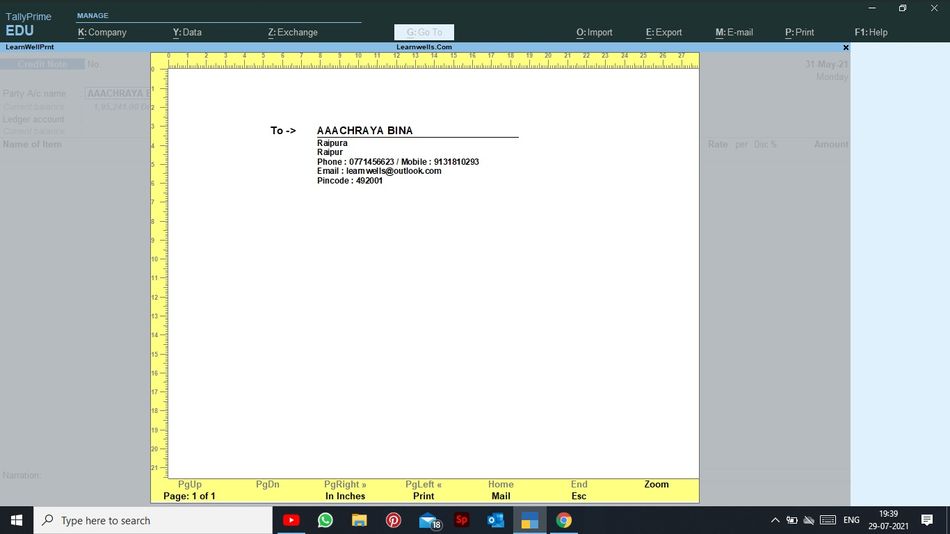
In a business, we manually write letters to our outstanding debtors or other people for legal purposes, etc. We occasionally enter the wrong address for a customer or lose their address, which causes issues. However, many of our issues were resolved if we kept track of addresses in Tally.With the help of this Tally TDL, we can now print envelopes with party addresses and do business as usual. With the help of this TDL file, we may print an envelope with the proper party address and mail it as needed. We can also change font and style of printing. To add new font change Font section in TDL code. In this Tally Prime and Tally ERP TDL code we can add some additional fields or we can remove extra fields according to our need, and this will work perfectly with Tally Erp9 and Tally Prime. Best simple tdl code to print envelope with address direct from Tally. Envelope TDL Code: How to use Print Envelope TDL code: HOW TO USE TDL CODE: Copy above TDL code and make a text file. Save text file then load in Tally Prime (Method provided below the code) Now go to voucher sheet to create a voucher, here you will find envelope print button in top of page Choose customer name in voucher and click on envelop print button. If you have customer details and address in ledger master, then you can print envelope properly. This is best free TDL to have in your Tally . Must have TDL file for Tally ERP9 and Tally Prime that can use for lifetime. This free TDL Code will perfectly work with Tally Prime. How to use Tally Invoice customize TDL video: Watch above video to learn : How to set customer address and other details in ledger. How to use envelope print button in Tally. FOLLOW THE BELLOW INSTRUCTIONS TO LOAD TDL FILE IN TALLY: Make a Text file of above code Save it in to your computer Copy the text file path including Name and extension (as – C:\Users\HP\Desktop\rec\envelope.txt) Open Tally Prime Software Click on Help and click on TDL & Addon  (for Tally Prime) Press F4 (to open a Box) Set Load TDL file on Startup – Yes Paste The path in blank space Press enter and save Now your Envelope Print TDL is ready to use

Jio Virtual PC and Air Fiber

Jio Virtual PC and Air Fiber | Reliance Jio unveiled Air Fiber and Jio Cloud PC

1 September 2022

Reliance announced the debut of Jio Cloud PC at the 45th AGM. Jio True 5G is being used to host this Virtual PC on the cloud. According to the invention, computers may be inexpensively powered in any house and place of work. The business also discussed its new offering, Jio AirFiber, during the AGM. Jio Air Fiber and Jio Fi are extremely similar, except Jio Air Fiber offers faster internet. However, Jio Cloud PC will save your expenses as compared to purchasing pricey laptops and desktops. Let’s discuss these two gadgets in more depth. Jio air fiber: Reliance Jio unveiled its Air Fibre wireless single-device solution during the AGM, which the firm claims would allow customers to experience internet speeds at home without the use of many cables. It will be possible to set up an end-to-end broadband service with the same ease as a hotspot. Jio cloud PC: Similar to PCs, cloud PCs don’t have any significant hardware needs. Put simply, it is a virtual computer. Users of the faster 5G network will be able to stream all calculations from distant server locations thanks to this functionality. It doesn’t need an upfront investment or the trouble of periodic upgrades; rather, it merely charges users for the amount of data they utilise. That is, a large number of PCs may be used at extremely low costs. What is Cloud Computing: Cloud computing refers to the delivery of services through the Internet. This service might be anything, such computing resources or off-site storage. In other terms, cloud computing is a computing model that uses internet technologies to deliver greatly scalable and flexible IT-related skills as a service. These services include amenities like infrastructure, platform, applications, and storage space. In this, customers pay for the services they use and utilise them in accordance with their demands. They don’t need to develop their own infrastructure for this. Nowadays, people demand service on the Internet constantly, and that too without delay, because there is so much competition in the world. We cannot rely on the outdated mainframe computing to achieve these needs, thus cloud distributed computing technology was deployed to address the issue. Consequently, large corporations began doing all of their tasks with ease.

Invoice customization TDL

2022 Best Free Tally Prime and Tally ERP9 Invoice customization TDL | Free Tally TDL Code to customize Invoice | How to create colored Tally Invoice

1 September 2022

In a firm we all need to conduct work professionally to impress our consumers. If we present professional appearing invoice to customer, undoubtedly they will impress with our store or organisation. If you use Tally accounting software, you are in the correct spot. Tally uses a straightforward yet robust invoicing style that may contain anything. Tally Invoice, however, does not appear professional. Therefore, we will create a colourful invoice today. The item headings and other areas of the invoice are coloured.With the help of this free Tally TDL code, we can customise and colour the Tally invoice item column information to suit our needs. In this Tally Prime and Tally ERP TDL code we can add some additional fields or we can remove extra fields according to our need, and this will work perfectly with Tally Erp9 and Tally Prime. Best simple tdl code to customize Invoice. Colored Tally Invoice TDL Code: How to use Invoice customization TDL code: HOW TO USE TDL CODE: Copy above TDL code and make a text file. Save text file then load in Tally Prime (Method provided below the code) Now create an invoice and take it print You can see changed header of item details section and changed color of invoice. This is best free TDL to have in your Tally . Must have TDL file for Tally ERP9 and Tally Prime that can use for lifetime. This free TDL Code will perfectly work with Tally Prime. How to use Tally Invoice customize TDL video: Watch above video to learn : How to change names in invoice print How to add color in invoice print. FOLLOW THE BELLOW INSTRUCTIONS TO LOAD TDL FILE IN TALLY: Make a Text file of above code Save it in to your computer Copy the text file path including Name and extension (as – C:\Users\HP\Desktop\rec\invoicetdl.txt) Open Tally Prime Software Click on Help and click on TDL & Addon  (for Tally Prime) Press F4 (to open a Box) Set Load TDL file on Startup – Yes Paste The path in blank space Press enter and save Now your Invoice TDL is ready to use

free daybook GST TDL

2022 Best Tally TDL for Tally Prime and ERP9 | All in One GST TDL 2022 | GST Report TDL for All type Vouchers | Daybook GST TDL for Tally Prime

31 August 2022

To making Tally more simple we use this Daybook GST Report TDL file for Tally Prime and for Tally Erp9. It is very special TDL file that can solve your GST return filling problems. This is Free TDL file for Tally to do GST work in simple way. We generate monthly or weekly reports for sale or purchase data to filling our GST returns. Sometime we need information like GST number GST percentage, Voucher and Bill Details and there IGST, CGST, SGST amounts with all voucher type. In tally when we generate GST reports of sale or purchase or Credit Note, Debit Note or other voucher types like Journal, Receipt, Payment etc., if our data has GST ledger , It will generate all vouchers GST reports together. We can call it Daybook GST Report TDL. With this free GST TDL code we can Export GST reports into Excel and work on it according to us. It will very helpful to file GST returns with Tally. We can use this TDL file for Tally Prime and Tally ERP9 We can modify this TDL code according to our need. We can add some additional fields, we can remove extra fields, and it is very simple to work with Tally Erp9 and Tally Prime. Best simple tdl code to Generate GST Reports. Daybook GST TDL Code: How to Daybook GST Report TDL code: HOW TO USE TDL CODE: Copy above TDL code and make a text file. Save text file then load in Tally Prime (Method provided below the code) Now a line will show in the name of Learnwell-GST in our tally home screen Gateway of Tally Click on it  and provide date for the period that you want to see and Export GSTIN report. You can also give a range to filter GST reports according to your need. This is best free TDL to have in your Tally . Must have TDL file for Tally ERP9 and Tally Prime that can use for lifetime. This free TDL Code will perfectly work with Tally Prime. How to use Daybook GST TDL video: Watch above video to learn : How to see daybook GST reports in Tally. How to filter details of voucher. FOLLOW THE BELLOW INSTRUCTIONS TO LOAD TDL FILE IN TALLY: Make a Text file of above code Save it in to your computer Copy the text file path including Name and extension (as – C:\Users\HP\Desktop\rec\daybookGST.txt) Open Tally Prime Software Click on Help and click on TDL & Addon  (for Tally Prime) Press F4 (to open a Box) Set Load TDL file on Startup – Yes Paste The path in blank space Press enter and save Now your Daybook GST Report TDL is ready to use

Gautam Adani

3rd Richest Person – Adani | Gautam Adani become World third richest | Gautam Adani net worth and business

30 August 2022

With a net worth of $ 137.4 billion, Indian billionaire Gautam Adani is now the third-richest businessperson in the world (about Rs 11 lakh crore). He passed French businessman Bernard Arnault to take this job. This marks the first time an Asian has been in the Bloomberg Billionaires Index’s top three. He is now only ranked after Bezos and Musk. Elon Musk, the founder of Tesla, is ranked first with a net worth of $251 billion, followed by Jeff Bezos with $153 billion. The only other Indian in the top 10 is Adani. Mukesh Ambani, the chairman of Reliance Industries, is ranked 11th with a net worth of $91.9 billion (Rs 7.3 lakh crore). Also read Jio Cloud PC and Air fiber Gautam Adani overtook Bill Gates last month: Adani rose to the fourth-richest businessperson last month. He surpassed Bill Gates. Adani’s net wealth increased by $60.9 billion alone in 2022. This is five times what every businessman makes. In February, he became richer than Mukesh Ambani, chairman of Reliance Industries. Adani’s net worth was $57 billion in April 2021: On April 4, Adani became a member of the club of millionaires. Centibillionaires are people whose net wealth is greater than $100 billion. Adani’s net worth was $57 billion in April of 2021. In the fiscal year 2021–2022, Adani’s net worth increased at the quickest rate in the whole globe. Seven firms owned by the Adani Group are publicly traded. Adani’s cement business too: The Indian cement division of Holcim had been announced to be purchased by Gautam Adani’s company earlier in May. $10.5 billion was spent on the transaction. The Adani Group quickly climbed to second place in the Indian cement industry as a result of this purchase. India’s largest private port operator: The largest private port operator and end-to-end logistics service provider in India is Adani Ports and Special Economic Zone Limited (APSEZ Ltd.). It has developed a portfolio of port infrastructure and services across India in less than two decades. The nation’s port capacity is represented by its 13 well-located ports and terminals, which total 24% of the total. Adani’s Group Journey: Listed in NSC and BSC in 1994 under Rs.150/share Started trading from Mudra Port in 1995 Started a Joint Venture with Wilmar in Singapore in 1996 2001 Started City Gas Distribution Business 2009 Indonesia’s Banyu mine acquired 2010 Australia’s Karmickal mine acquired Started manufacturing solar PV panels in 2017 Fortune emerges as largest food FMCG brand in 2018 Emerged as the world’s biggest IRM player in 2019 2020 entry into airport business

alphabetical stock item in invoice

2022 Tally Prime and Tally ERP 9 Free TDL Code to create alphabetical stock items | Create more attractive invoices by sorting stock items in alphabetical Order | Best Tally Prime TDL free code

30 August 2022

We may use this free Tally TDL code to generate a flawless invoice for our clients if you print an invoice from Tally but it doesn’t seem great due to a random stock item serial. Yes! We may now print invoices with alphabetically ordered items.By sorting stock items in Tally Invoice, we may create a flawless invoice with this item sorter (Tally TDL). We may add or remove new fields from this Tally Prime and Tally ERP TDL code in accordance with our needs, and it will function flawlessly with Tally Erp9 and Tally Prime. The best basic TDL code for sorting stock items alphabetically in invoice printing. We can modify this TDL code according to our need. We can add some additional fields, we can remove extra fields, and it is very simple to work with Tally Erp9 and Tally Prime. Best simple tdl code to make invoice with alphabetical items. TDL Code: How to use Invoice with alphabetical Item TDL code: HOW TO USE TDL CODE: Copy above TDL code and make a text file. Save text file then load in Tally Prime (Method provided below the code) Now go to generate invoice and fill multiple stock items Then take a print of that invoice voucher. You will find all items in alphabetical order in print. This is best free TDL to have in your Tally . Must have TDL file for Tally ERP9 and Tally Prime that can use for lifetime. This free TDL Code will perfectly work with Tally Prime. How to use Item history TDL video: Watch above video to learn : How to create a TDL to sort item names. How to create collection with repeat option for Tally TDL FOLLOW THE BELLOW INSTRUCTIONS TO LOAD TDL FILE IN TALLY: Make a Text file of above code Save it in to your computer Copy the text file path including Name and extension (as – C:\Users\HP\Desktop\rec\alphabetialItems.txt) Open Tally Prime Software Click on Help and click on TDL & Addon  (for Tally Prime) Press F4 (to open a Box) Set Load TDL file on Startup – Yes Paste The path in blank space Press enter and save Now your alphabetical item in invoice TDL is ready to use

moon mission

3 Points to Understand Artemis mission NASA | How does worth Artemis Moon mission | NASA new moon mission | Artemis 1, Artemis 2 and Artemis 3 Moon mission of NASA

29 August 2022

With its Artemis mission NASA, the US space agency NASA plans to return people to the moon for the first time in over 50 years. On Monday, August 29, the first action in this direction will be taken. At 6:03 p.m., Artemis-1, the mission’s first test flight, will lift off from Florida’s Space Coast. What is the goal of the Artemis-1 mission?: Unmanned mission Artemis-1. With the first mission, researchers hope to determine if astronauts can safely operate in the lunar environment. Whether the astronauts will be able to safely return to Earth after visiting the moon is another concern. The Orion crew capsule and the new Space Launch System (SLS) Megarocket will travel to the Moon, claims NASA. Normally, astronauts live in the crew capsule, but not this time. It will take the capsule 42 days, 3 hours, and 20 minutes to complete this mission, after which it will return to Earth on October 10. A total distance of 20 lakh 92 thousand 147 kilometres would be covered by the spaceship. Also read India becomes 5th largest economy Understand the entire Artemis mission in three points: Jack Burns, a professor and scientist at the University of Colorado Boulder, claims that Artemis-1’s rocket has “heavy lift” and possesses the most potent engines ever seen on a rocket. It will go to the Moon, deploy a few tiny satellites into its orbit, and then set up shop there. The launch of Artemis-2 is anticipated for 2024. There will be some astronauts in it as well, but they won’t walk on the moon. Only by spinning in the moon’s orbit will they be able to return. Despite the fact that it will take more time. Following this, Artemis-3 will be sent on its final mission. Landing on the moon’s surface will be the astronauts’ last destination. Around 2030, this mission can be launched. The Human Moon expedition will include women for the first time. A person of colour, or someone who is not white, will also be a member of the team, according to Burns. Everyone will travel to the Moon’s South Pole to look for ice and water. How is Artemis different from the Apollo missions?: JF Kennedy, a former US president, planned the Apollo expedition to overthrow the Soviet Union. His objective was to position America top in the world in the fields of science and technology, not only space exploration. However, the situation has changed in the nearly 50 years since then. The United States no longer wants to use the Artemis mission to beat China or Russia. NASA’s mission is to properly investigate anything found outside of the Earth. Scientists want to use the dirt and ice on the moon to create structures, food, and fuel. NASA’s Human Moon mission delayed for decades: While Barack Obama was the US President, the SLS rocket was constructed in 2010. Through the “constellation programme,” astronauts were intended to be sent to the moon at this time, but the trip was scrapped after a number of delays. The SLS rocket launch was scheduled for 2016 under the agency’s revised plans. After delays, Jim Bridenstein, the former NASA administrator, discovered that the rocket’s preparation would require an additional year in 2019. A government assessment from the same year stated that the NASA mission’s delay was costing the country millions of dollars. The nation’s rulers, from Donald Trump to Joe Biden, though, persisted in trying to make the Artemis mission a success.

item detailed history

Full Detailed Item History TDL at Invoice Time | 2022 Best Tally Prime and Tally ERP 9 TDL for Invoicing | Sales and Purchase History TDL

29 August 2022

We always need something special that solve all our problems and create all things in simple way according to our need. Same things we required when invoicing in Tally. When we select any item in Tally invoice we need to see it’s history of sales and purchase with all details. Like when this item was purchased or sold, who was the customer, Date, item rate, quantity,discount etc.. Everything we need to know about that item. So today I have special full detailed item history TDL at invoice time for your Tally Prime and Tally ERP9. With this free TDL code we can see Invoice number, Date, voucher type, Party Detail, Item Rate, Discount, Amount, Godown etc. in One place. Load TDL file in Tally ERP9 or in Tally Prime, then go for invoicing , select item and press Alt+H to see full history of stock item with Sales, Purchase, Debit and Credit Note History. We can modify this TDL code according to our need. We can add some additional fields, we can remove extra fields, and it is very simple to work with Tally Erp9 and Tally Prime. Best simple tdl code to make see full Item History Detail. TDL Code: How to use Item detailed history TDL code: HOW TO USE TDL CODE: Copy above TDL code and make a text file. Save text file then load in Tally Prime (Method provided below the code) Now go to generate invoice and select item and and press ctrl+H to see item history. In item history you will find Sales and Purchase details of item with there Date, Party Name, Voucher type, Invoice number, item rate, item discount, quantity, godown etc. everything in one place. This is best free TDL to have in your Tally . Must have TDL file for Tally ERP9 and Tally Prime that can use for lifetime. This free TDL Code will perfectly work with Tally Prime. How to use Item history TDL video: Watch above video to learn : How to add see item full history tdl. How to load tdl code in Tally prime and how to use Tally shortcut button for item history TDL. FOLLOW THE BELLOW INSTRUCTIONS TO LOAD TDL FILE IN TALLY: Make a Text file of above code Save it in to your computer Copy the text file path including Name and extension (as – C:\Users\HP\Desktop\rec\itemhistory.txt) Open Tally Prime Software Click on Help and click on TDL & Addon  (for Tally Prime) Press F4 (to open a Box) Set Load TDL file on Startup – Yes Paste The path in blank space Press enter and save Now your Item full history TDL is ready to use

iPhone 14 satellite feature

Satellite connectivity in iPhone 14 | New iPhone 14 features impressive or not | Upcoming iPhone-14 Satellite feature

28 August 2022

The date of Apple’s “Far Out” event is set for September 7. This will see the introduction of the iPhone-14 series. There are a lot of stories and leaks concerning this functionality. In such a scenario, it is asserted in a recent report that the iPhone 14 will support satellite communication. Users will be able to make calls and send messages even when there is no cellular service with this assistance. Customers will find this function to be very useful, especially in times of need. This allows Apple to include the “Emergency Message Via Contacts” function in their products, enabling consumers to contact emergency services even if there is no cellular network. Also read artemis mission nasa Satellite communications advisor Tim Farrar gave information about iPhone 14: Tim Farrar, a satellite communication expert at a US-based business, posted this information on his Twitter page. Elon Musk’s SpaceX and T-Mobile teamed up on August 25 to try to connect mobile devices to a network of satellites in order to improve connection even in small towns and villages. How to get satellite connection: To use the satellite network, powerful gear will be needed. In addition to this, it has a high price. However, there will be certain restrictions on the satellite communication capability. For instance, it can take a minute or two for the signal to be sent from it. To use the LEO satellite communication functionality, you must be outside under a clear sky. You will be able to send SOS distress signals and brief emergency SMS using this capability. Globalstar acquires 17 satellites for satellite connectivity: According to Farrar, the T-Mobile and SpaceX satellites were launched in anticipation of the iPhone 14’s satellite networking functionality. This function is being launched by Apple in collaboration with Globestar, a significant US satellite provider. Globalstar said earlier this year that it has purchased 17 satellites to provide its clients satellite connection. The report of satellite connectivity has also arrived in April: It’s interesting to note that discussions about Apple’s advancements for the iPhone 14 series have previously brought up satellite connectivity. There have also been claims of the iPhone 14 having satellite connectivity in April. Users of the iPhone 14 will be able to connect to satellite networks during crises in distant locations, according to renowned tech writer Mark Gurman. The iPhone 13 is anticipated to be the first device to have this capability. According to several sources, the iPhone 14 will include an emergency feature that would let users send a text message when cellular connectivity is unavailable. Can a common person in India buy a satellite phone?: In India, the average person may buy a satellite phone. The Inmarsat iSatphone 2 is available for around Rs 70,000. Incoming and outgoing calls cost Rs 35/minute for non-government customers, while roaming calls cost Rs 260/minute. Licensing Process for Satellite Phones: Users will need to get a No Objection Certificate in order to use such a phone (NOC). In order to do this, a certain application format (Annexure-A and Annexure-1) containing information such name, address, and details must be given to the Department of Telecommunications (DoT). You may use a satellite phone if you have authorization from us. What are the rules regarding satellite phones in India: According to a government of India recommendation, Section 6 of the Indian Wireless Act and Section 20 of the Indian Telegraph Act both forbid the use of Thuraya/Iridium satellite phones in India. Visitors and tourists must notify the Indian government if they use satellite phones while in India. It will also require permission and a licence to operate. If they don’t, they risk having legal action taken against them. According to Indian legislation, anyone detected in the country using an unlicensed satellite phone may face charges. Indian law enforcement officials will seize all unlawful phones that individual is in possession of. All travellers and tourists to India are urged to follow local laws and not to bring or use a satellite phone if they have any. So let’s check iPhone 14 Launching and how can use satellite feature of it.